How to Make a USB Laptop Keyboard Controller : This Instructable will provide a step by step procedure for building a USB laptop keyboard and touchpad controller. I created this guide and video to hopefully make it easier for people to re-purpose an old laptop. A typical laptop keyboard relies o…
Category Archives: Hardware
How to Connect to the Serial Port on a Raspberry Pi using a USB Adapter or TTL Converter – Practicing Electronics
Using an RS232-to-TTL converter
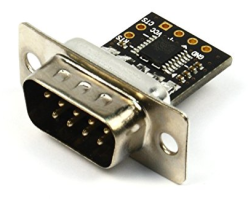
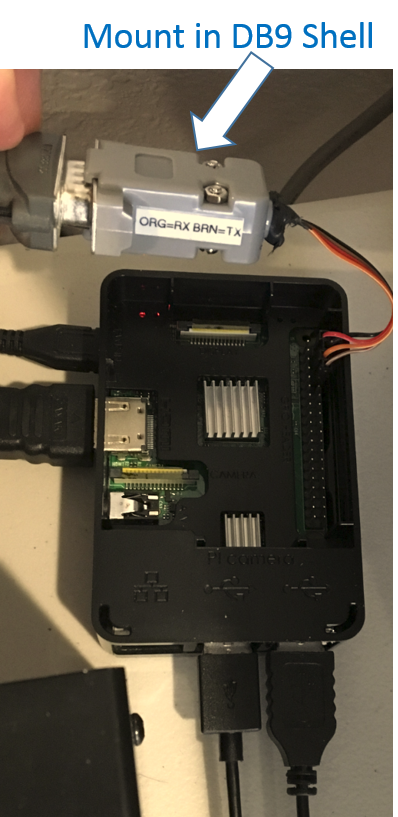
An RS232-to-TTL converter converts RS232 voltage levels to TTL levels that can be used by the Pi (and vice versa). I use NulSom’s Ultra Compact RS232 to TTL Converter with Male DB9. This converter fits within a DB9 back shell.
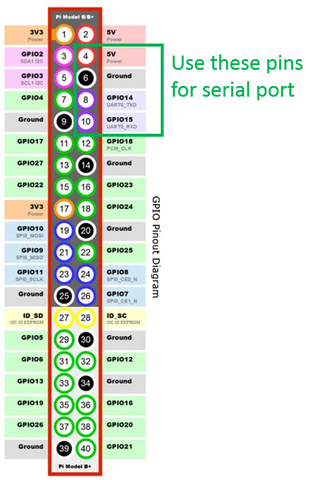
The converter has solder terminals that I connected to female header adapters, and connected to pins 4, 6, 8, and 10 on the Pi.
The setup is more compact compared to using a USB adapter.
In the Pi, the serial port might need to be enabled in the configuration settings.
My serial port shows up in the /dev folder as ttyS0.
FCC ID Search
Searchable FCC ID Database
The information resource for all wireless device applications filed with the FCC.
Check Today’s FCC ID Filings or Check FCC ID Filings by Country or Date
Source: FCC ID Search
List Hard Drives using Command Prompt and PowerShell
List Hard Drives using Command Prompt & PowerShell in Windows 10
If you frequently work with the Command Prompt or PowerShell, you may need to copy files from or to an external drive, at such, and many other times, you may need to display the drives within the console window. In this post, we will show you how you can list drives using Command Prompt or PowerShell in Windows 10/8/7.
List Hard Drives using Command Prompt
If you need to simply list the drives, you may use WMIC. Windows Management Instrumentation (WMI) is the infrastructure for management data and operations on Windows-based operating systems.
Open a command prompt, and type the following command:
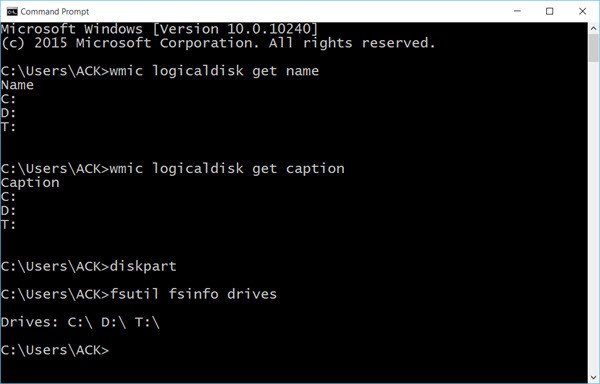
wmic logicaldisk get namePress Enter and you will see the list of Drives.
You can also use the following parameter:
wmic logicaldisk get caption
Using the following will display Device ID and volume name as well:
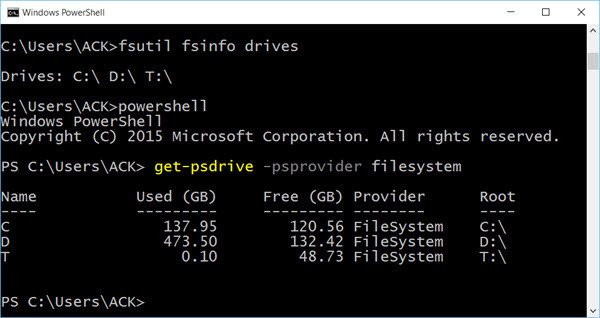
wmic logicaldisk get deviceid, volumename, descriptionWindows also includes an additional command-line tool for file, system and disk management, called Fsutil. This utility helps you list files, change the short name of a file, find files by SID’s (Security Identifier) and perform other complex tasks. You can also use fsutil to display drives. Use the following command:
fsutil fsinfo drivesIt will show mapped drives too.
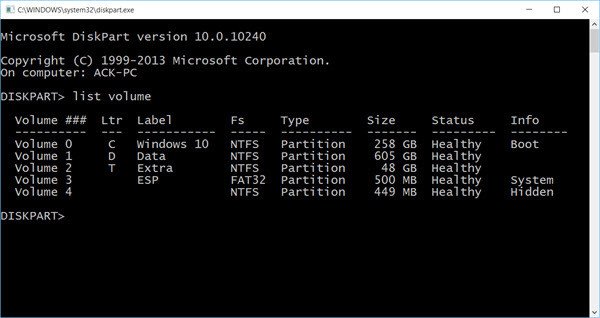
You can also use diskpart to get a list of drives along with some more details. The Diskpart utility can do everything that the Disk Management console can do, and more! It’s invaluable for scriptwriters or anyone who simply prefers working at a command prompt.
Open CMD and type diskpart. Next use the following command:
list volume
You will see that the console displays the Volume number and letter, label, formatting type, partition type, size, status, and other information.
List Hard Drives using PowerShell
To display drives using PowerShell, type powershell in the same CMD windows and hit Enter. This will open a PowerShell window.
Now use the following command:
get-psdrive -psprovider filesystem
Source: List Hard Drives using Command Prompt and PowerShell
How do I update the firmware of my SRT series Smart-UPS using the Firmware Upgrade Wizard?
Smart-UPS SRT 2200 SRT2200RMXLA
Source: How do I update the firmware of my SRT series Smart-UPS using the Firmware Upgrade Wizard?
Lenovo Product Specifications Reference(PSREF)
Hikvision Naming Rules: What do Hikvision model numbers mean? — SecurityCamCenter.com
Hikvision Naming Rules: What do Hikvision model numbers mean?
For many people Hikvision model numbers can look completely unintelligible. This guide can help you to understand the naming rules and the logic behind the Hikvision’s model numbers (for analog or IP camera, NVRs, DVR, PTZs).
The first thing to note is that the naming rules are slightly different depending on the type of product. The letters and numbers in the model tag mean different things for IP cameras, PTZ cameras or recorders. It will all become clearer shortly.
Naming rules: Hikvision IP cameras
The Hikvision IP camera range varies from dome to bullet to turret (and more) and it shares the same naming rules across models. The image below shows the possible variances.
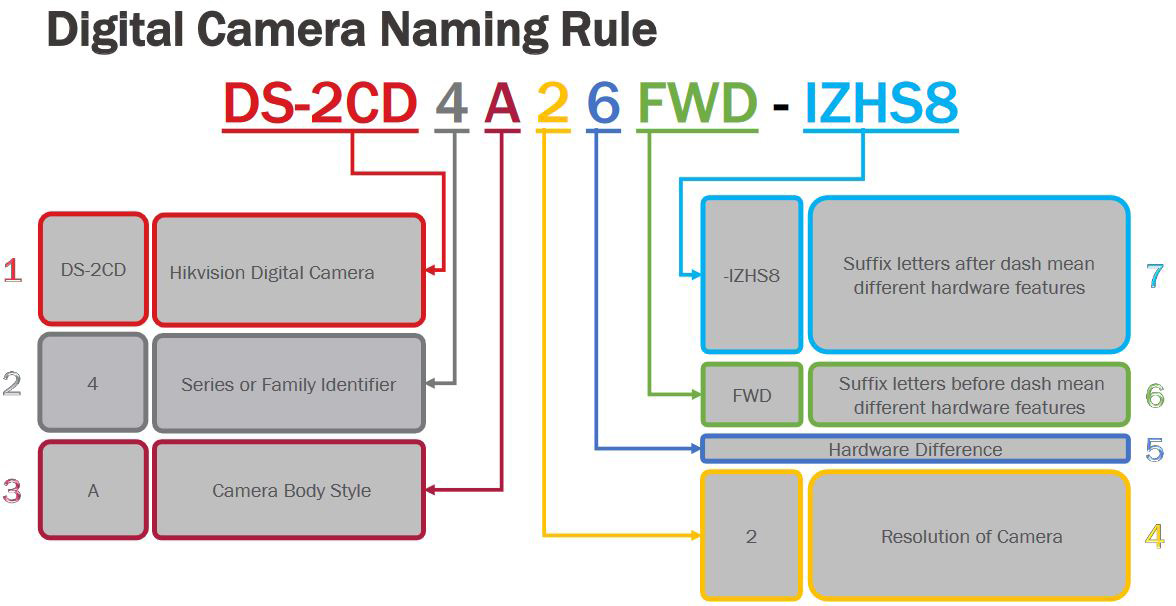
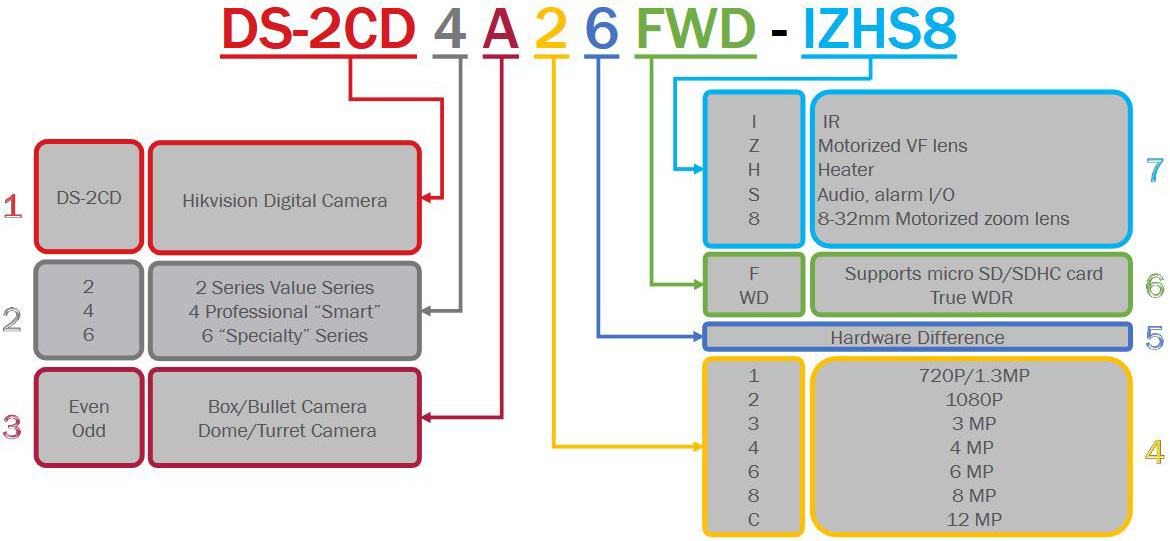
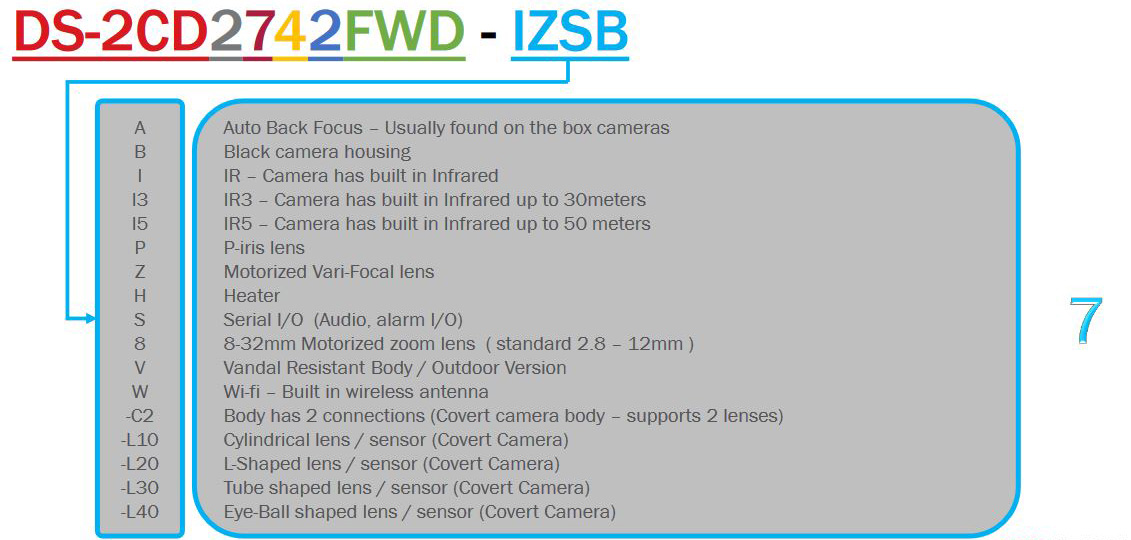 To put this into practice, DS-2CD2123G0-I is an 2MP entry level outdoor dome camera with IR. While DS-2CD2635FWD-IZS is a 3MP bullet camera with IR, motorized varifocal lens and I/O port.
Naming rules: Hikvision PTZ cameras
As PTZ cameras are more complex than regular IP ones, the naming convention is slightly different to take into account the features found only in these cameras. The image below shows the different naming possibilities:
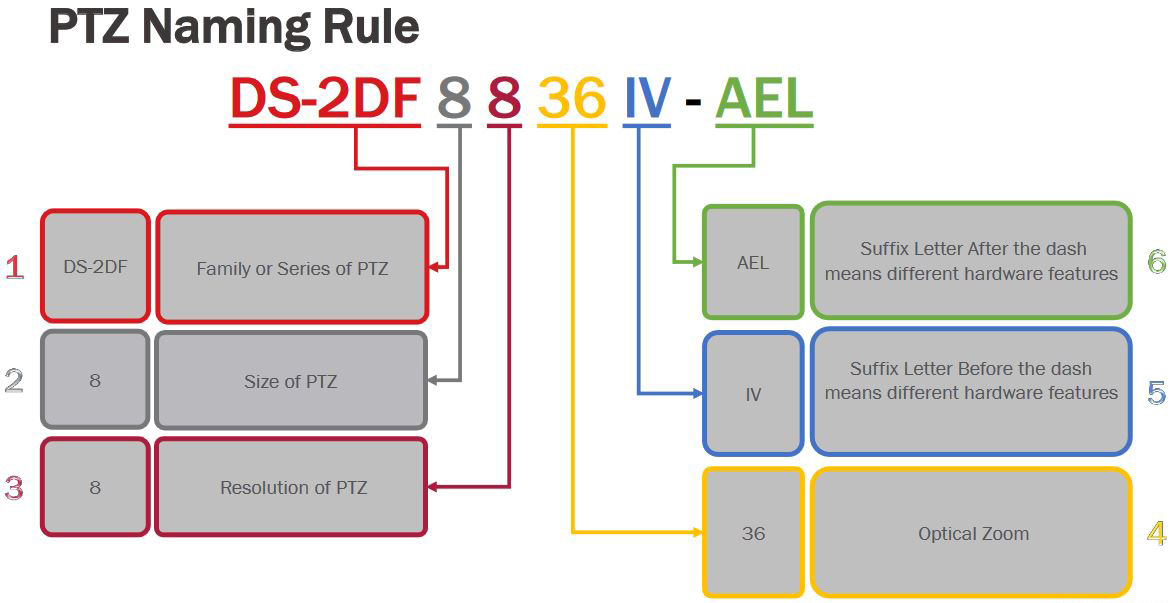
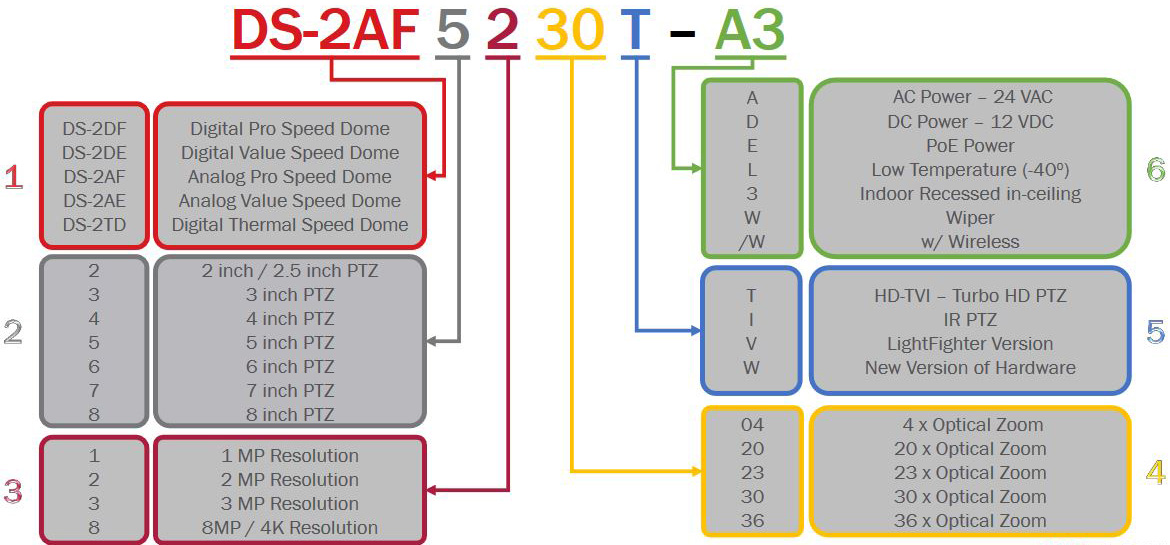 For example the DS-2DF8225IX-AELW camera is a 8” 2MP advanced PTZ camera with 25x optical zoom and IR, which can operate in low temperatures. While the DS-2DE4225IW-DE is a 4″ 2MP PTZ with 25x optical zoom.
Naming rules: Hikvision NVRs
A NVR is an abbreviation Network Video Recorder and they have their own naming rules which includes important information such: the product line, the number of hard drives that can be installed, the number of channels, the megapixels supported etc. Below is the naming chart for Hikvision NVRs.
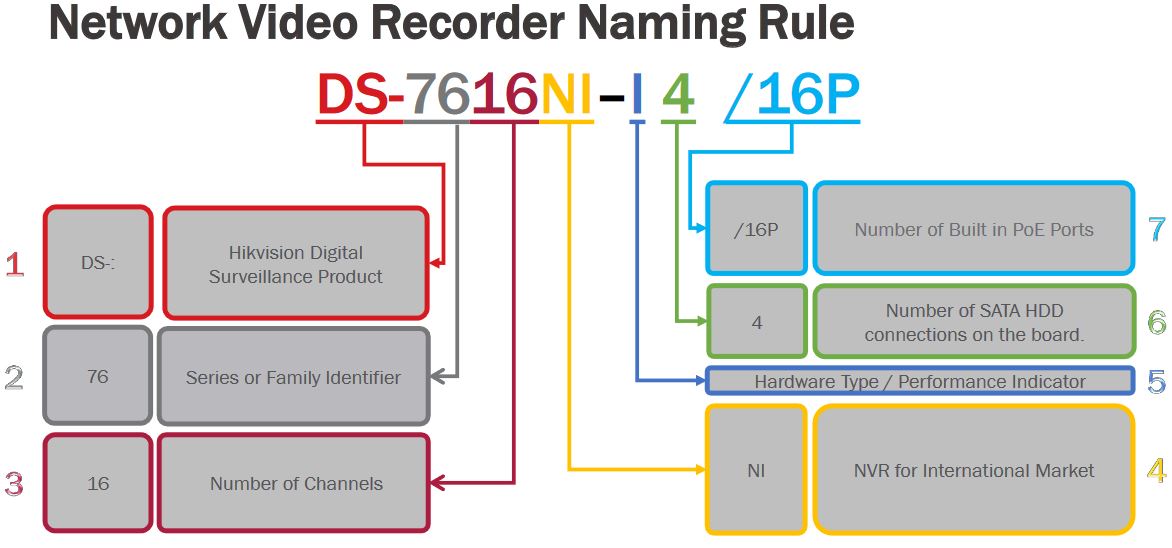
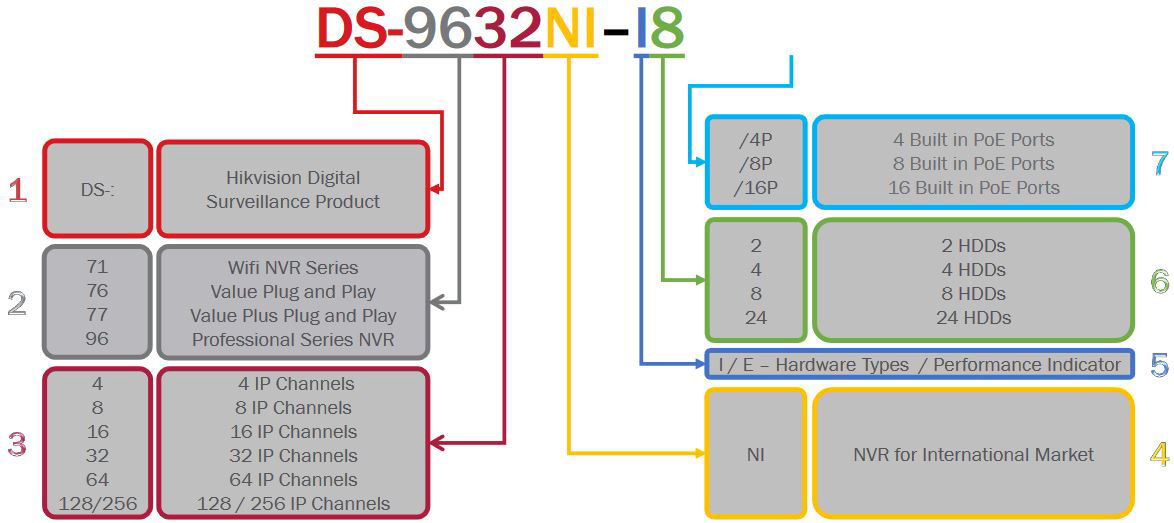
Naming rules: Hikvision DVRs
A DVR is an abbreviation Digital Video Recorder (so-called analog recorders) and they have their own naming rules which includes important information such: the product line, the number of analog cameras supported, the number of hard drives that can be installed. Below is the naming chart for Hikvision DVRs.
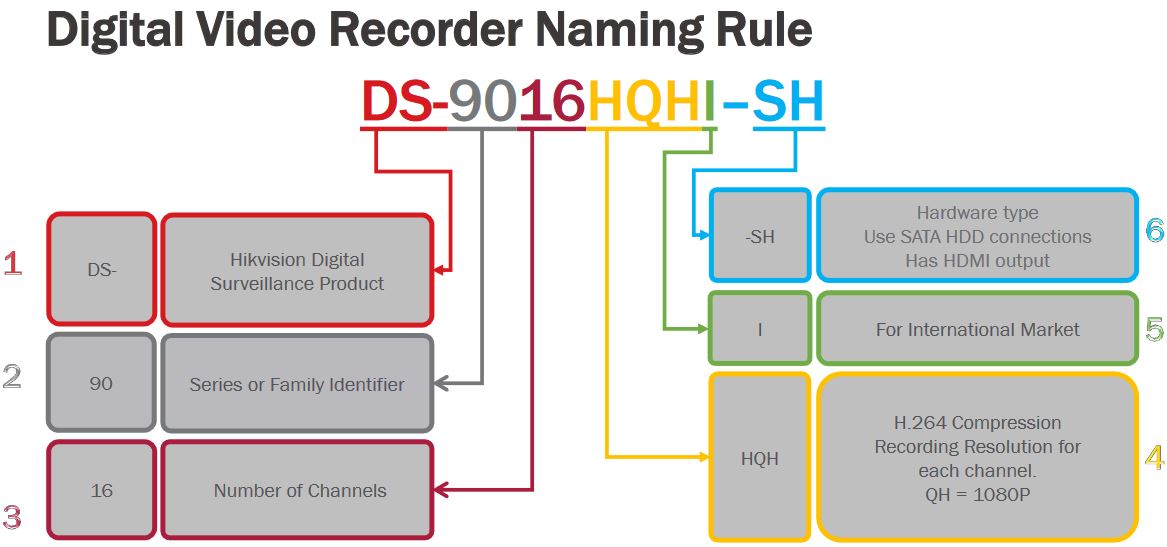
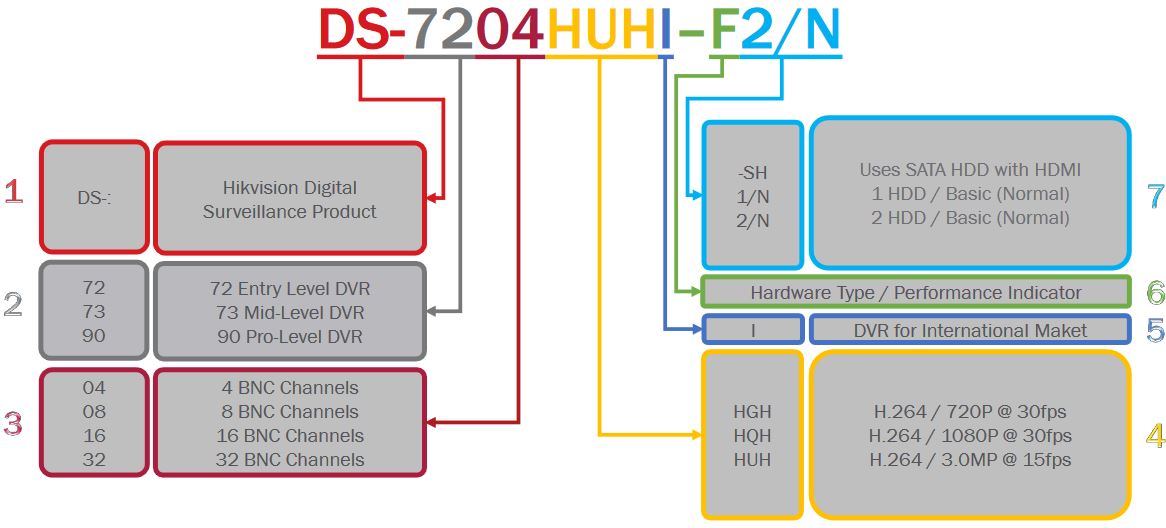
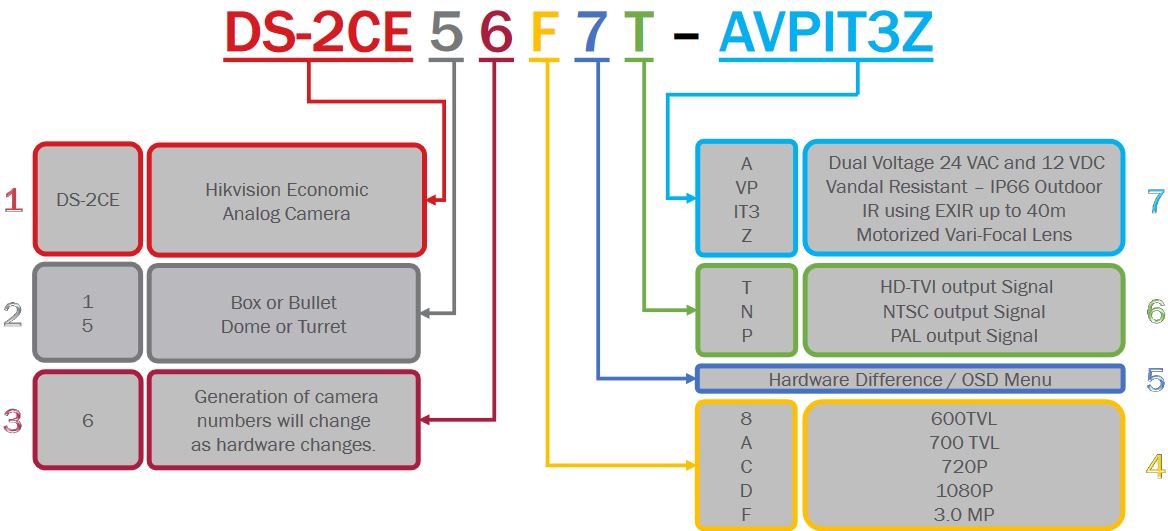
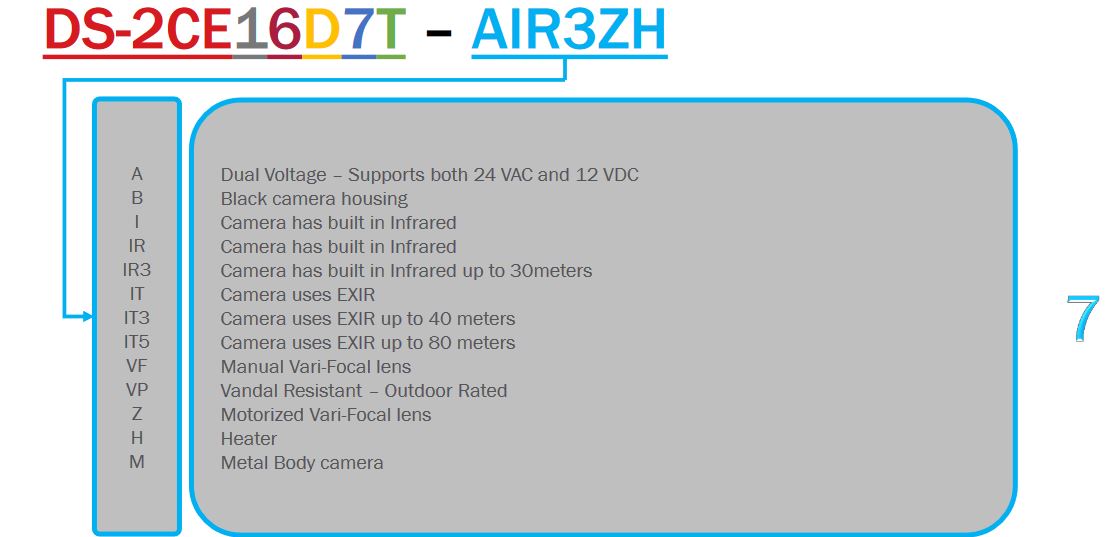
Naming rules: Hikvision Analog cameras
The Hikvision analog camera range varies from dome to bullet to turret (and more such as box cameras) and it shares the same naming rules across models. The image below shows the possible variances.
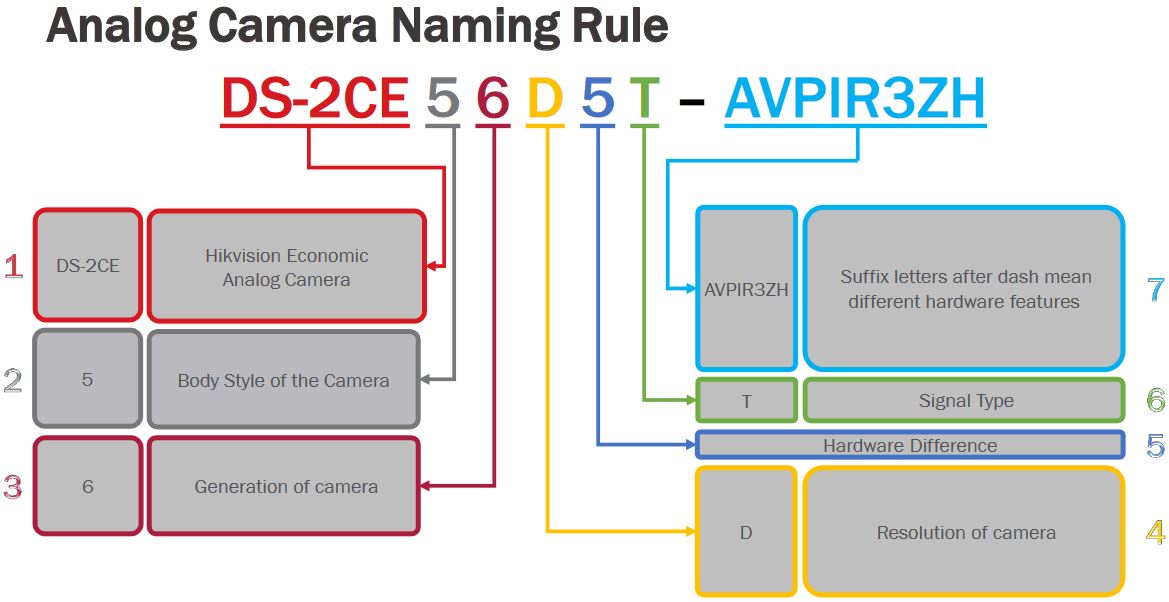
Source: Hikvision Naming Rules: What do Hikvision model numbers mean? — SecurityCamCenter.com
Open-Source HomeKit Camera by brutella – Thingiverse
Ubiquiti Help Center
UniFi – LED Color Patterns for UniFi Devices
Support Center for Ubiquiti — Learn about our products, view online documentation, and get the latest downloads.
Source: Ubiquiti Help Center
How To Reset an APC AP9630 / AP9631 to DHCP Mode | Chris Parker
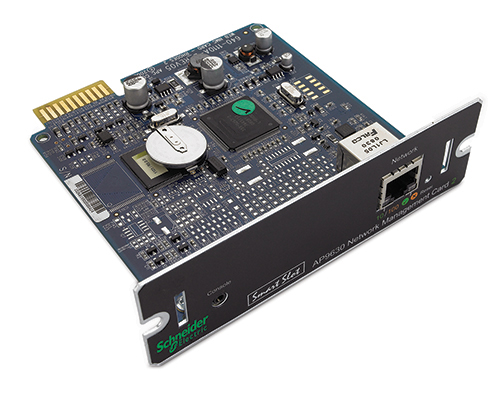
Several years ago I purchased an APC AP9630 Network Management Card 2 (AP9630 NMC) for a Smart-UPS of mine. The manual was not clear how to change the mode of the card to enable DHCP without using a serial cable. (Who even has a laptop with an old serial port?!)
It turns out there are two reset modes for the card:
- Pressing the reset button for 5-7 seconds resets only the password.
- Pressing the reset button for 20 seconds will restore the card to factory default settings and switch it to DHCP mode.
This should also work on the AP9631.
Hopefully, this will get indexed and save some people some time in figuring it out…
Source: How To Reset an APC AP9630 / AP9631 to DHCP Mode | Chris Parker