To reset the SPA-2102 to factory defaults follow these steps:
Plug in power adapter.
Plug in a phone to ‘Phone 1′ port of the SPA-2102.
Dial **** You should hear ‘Configuration Option Menu’.
Dial 73738# (RESET#) Press 1 to confirm the reset.
The SPA-2102 should now have been reset to factory default settings.
You may need to do the following to set up web management depending on which interface you are coming in on:
Dial **** into the phone connected to the ATA device. You should hear ‘Configuration Option Menu’.
Dial 7932 then press 1 to enable. Hang up when you hear option saved.
2. Get access to your SPA-2102 web interface. Plug in Ethernet cable to router and wait for several seconds.
Dial ****110# Listen to IP Address which is read back to you.
Plug your PC into the LAN (Ethernet) port of the SPA-2102. Enter IP Address into your web browser (For example. http://192.168.1.10). You should now see the Linksys SPA-2102 Web Interface
Show “Copy as Path” Always in Right-Click Menu Without Shift Key
This post tells you how to always show the Copy Path option in the right-click menu by default in Windows 10, without needing to press Shift every time.
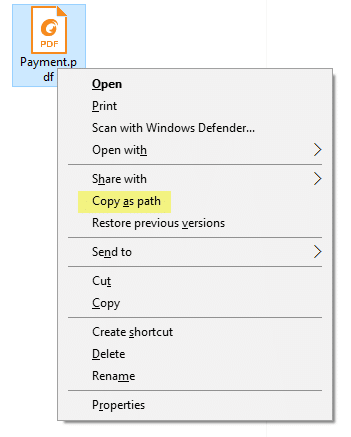
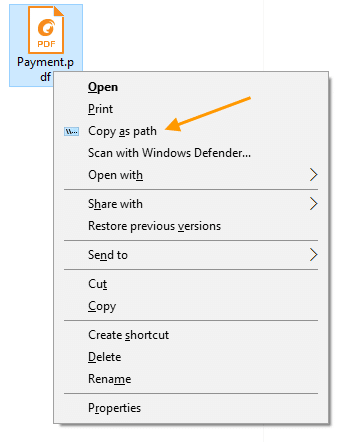
The much useful “Copy as Path” built-in context menu exists in all versions of Windows. It’s an extended command which means you need to hold down the Shift key to access the extended menu item. Press and hold Shift, and right-click on a file or folder. Click “Copy as Path option” in the context menu. The object’s (file or folder) full path is now copied to the Clipboard.
Here is how the standard “Copy as Path” option appears.
Copy as path right-click menu with Shift pressed.
Always Show “Copy as Path” in the Right-click Menu
If you frequently use Copy as Path, having to access it by pressing the Shift key every time can be annoying like hell. There is a registry tweak to show the menu by default without having to press the Shift key down.
Copy the following lines to Notepad.
Windows Registry Editor Version 5.00

;Show Copy as Path always in the right-click menu, without pressing SHIFT
;Ramesh Srinivasan, Winhelponline.com

[HKEY_CLASSES_ROOT\Allfilesystemobjects\shell\windows.copyaspath]
@="Copy &as path"
"Icon"="imageres.dll,-5302"
"InvokeCommandOnSelection"=dword:00000001
"VerbHandler"="{f3d06e7c-1e45-4a26-847e-f9fcdee59be0}"
"VerbName"="copyaspath"
How to Make a USB Laptop Keyboard Controller : This Instructable will provide a step by step procedure for building a USB laptop keyboard and touchpad controller. I created this guide and video to hopefully make it easier for people to re-purpose an old laptop. A typical laptop keyboard relies o…
Add the following directive to the server configuration file:
push “redirect-gateway def1”
If your VPN setup is over a wireless network, where all clients and the server are on the same wireless subnet, add the local flag:
push “redirect-gateway local def1”
Pushing the redirect-gateway option to clients will cause all IP network traffic originating on client machines to pass through the OpenVPN server. The server will need to be configured to deal with this traffic somehow, such as by NATing it to the internet, or routing it through the server site’s HTTP proxy.
If you want to configure this on the client side, put

10mmMiniature Screw (E10)
11mmMiniature Candelabra (E11)
12mmCandelabra (E12)
14mmEuropean (E14)
17mmIntermediate (E17)
26mmMedium (E26)
39mmMogul (E39)
Miniature Bipin
Medium Bipin
Single Pin
Recessed Double Contact
4-Pin
2GX-13
4mmG4
4mmGU4
5mmG5
5.3mmGU5.3
5.3mmGX5.3
5.3mmGY5.3
6.35mmG6.35
6.35mmGY6.35
6.35mmGZ6.35
8mmGY8
8.5mmG8.5
9mmG9
9mmG9 Pin Blade
9.5mmG9.5
9.5mmGZ9.5
12mmG12
Miniature Bayonet
Double Contact Bayonet (BA15d)
Single Contact Bayonet (BA15s)
Index Double Contact Bayonet
Wedge
Wedge D.F.
Wedge S.F.
RX7s
Slide
Wedge Subminiature
2G7
2GX-7
2G11
G23
G24d-2
G24d-3
G24q-1
G24q-2
G24q-3
GX23
GX23-2
GX24q-2
GX24q-3
GX24q-4
GX24q-5
Right Angle Prefocus
Axial Prefocus
Straight
Midget Flanged Single Contact
Miniature Flanged Single Contact
Miniature Single Contact
P28S
PK22s
PX26d
Festoon
3 Contact Lugs
Mogul End Prong (GX16d)
PGJ5
Side Prong
Lead wires
How to Make a USB Laptop Keyboard Controller : This Instructable will provide a step by step procedure for building a USB laptop keyboard and touchpad controller. I created this guide and video to hopefully make it easier for people to re-purpose an old laptop. A typical laptop keyboard relies o…
The comprehensive add-on boards & GPIO Pinout guide for the Raspberry Pi