Source: VB-Audio home page
Category Archives: video
MythTV, Open Source DVR
Source: MythTV, Open Source DVR
NDI Tools | NDI.tv
NDI® Tools is a free suite of applications designed to introduce you to the world of IP—and take your productions and workflow to places you may have never thought possible. With a single download, you gain the ability to integrate more devices and applications into your workflow, insert more content into your shows, and expand video opportunities throughout your network.
Source: NDI Tools | NDI.tv
How To Reset Your GoPro WiFi Password In Less Than 2 Minutes
How to rotate and flip videos using Handbrake – IT Support Guides
How to rotate and flip videos using Handbrake
HandBrake is a free tool that’s available for Windows, Mac OS and Ubuntu that allows you to take a video in various formats and convert it to an MP4.
The steps below show how to rotate the video being processed.
Before beginning, you need to download and install HandBrake.
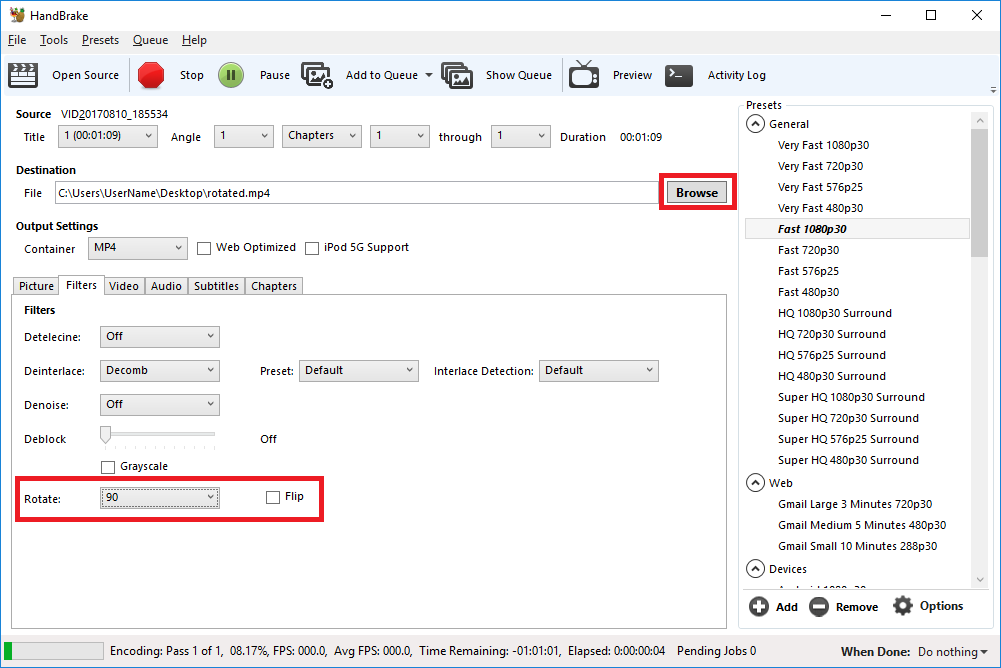
- Open HandBrake and load your video using the ‘Source’ button to select the video you want to rotate or flip
- Choose where to save the rotated video by clicking on the ‘Browse’ button to select where the converted file will be saved.
- Open the ‘Filters’ tab
- The ‘Rotate’ option allows you to choose four different options
- 0 – do nothing
- 90 – rotate to the right
- 180 – turn upside down
- 270 – rotate to the left
- Choose the rotate option you require
- Click ‘Start Encode’ to begin
- At the bottom of the window you will see the progress
Help! It didn’t work
Try the manual way of rotating, by applying manual filters.
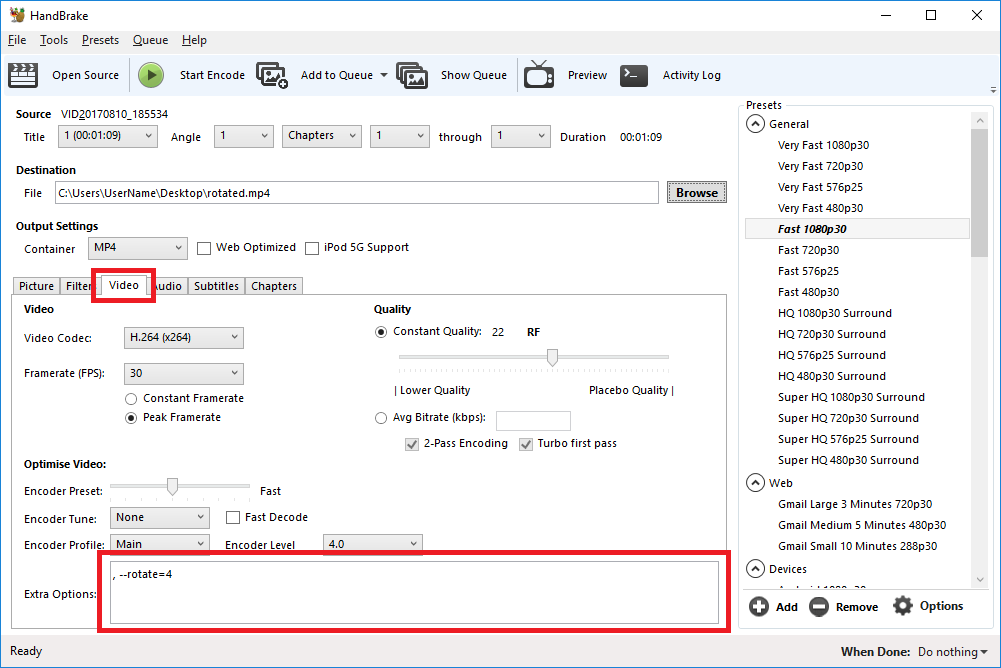
- Open the ‘Video’ tab
- We’ll be working with the ‘Extra Options’ setting.
- Once you have the required command entered, click ‘Start Encode’ to begin.
Rotate 90 degrees clockwise
To rotate 90 degrees clockwise, enter the following command into the ‘Extra Options’ setting:
, --rotate=4Rotate 90 degrees anti-clockwise
To rotate 90 degrees anti-clockwise, enter the following command into the ‘Extra Options’ setting:
, --rotate=7Rotate 180 degrees (upside down)
To rotate 180 degrees so that the video is upside down, enter the following command into the ‘Extra Options’ setting:
, --rotate=3Other options?
The official HandBrake documentation has more detail on what other options are available.
1 : x flip
2 : y flip
3 : 180 degrees rotate (also the DEFAULT)
4 : 90 degrees rotate (clockwise)
5 : 90 degrees rotate + y flip
6 : 270 degrees rotate + y flip
7 : 270 degrees rotate
Source: How to rotate and flip videos using Handbrake – IT Support Guides
Comcast will launch short-form video platform in coming weeks
Comcast has long been rumored to be developing a short-form video platform, but now it appears the platform has a name and a time frame. Apparently, the platform could be called “Watchable”—although the name is not set in stone yet—and it will be launching in the next few weeks.
Business Insider reports that Comcast’s platform will host videos produced by Vox and Buzzfeed, which are backed by Comcast, in addition to videos made by “lifestyle and comedy sites like AwesomenessTV, Refinery29, and The Onion, news sites like Mic and Vice, as well as legacy brands like NBC Sports.” The video producers have agreed to let Watchable stream any unlicensed, original videos, which will be curated for Comcast customers that have an Xfinity X1 set top box, so the Web videos would appear alongside more traditional TV.
Video producers might be interested in distributing to Comcast’s new platform because of its advertising muscle. A source speaking to Business Insider said that the company wouldn’t pay its short-form video producers any licensing fees, but they would a portion of any advertising revenue. Also, the deals will be non-exclusive, so producers will be able to post the video in multiple places.
Read 1 remaining paragraphs | Comments