Category Archives: Tech
NeoLoch, LLC
NeoLoch, LLC. Custom firmware and electronics kits for the electronics enthusiast.
Source: NeoLoch, LLC
How to rotate and flip videos using Handbrake – IT Support Guides
How to rotate and flip videos using Handbrake
HandBrake is a free tool that’s available for Windows, Mac OS and Ubuntu that allows you to take a video in various formats and convert it to an MP4.
The steps below show how to rotate the video being processed.
Before beginning, you need to download and install HandBrake.
- Open HandBrake and load your video using the ‘Source’ button to select the video you want to rotate or flip
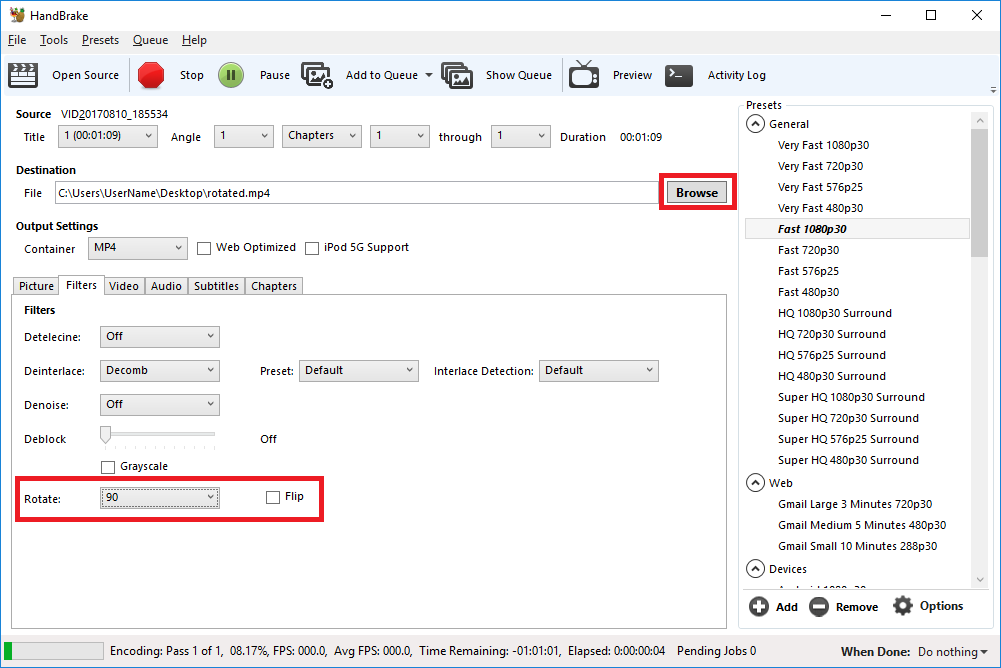
- Choose where to save the rotated video by clicking on the ‘Browse’ button to select where the converted file will be saved.
- Open the ‘Filters’ tab
- The ‘Rotate’ option allows you to choose four different options
- 0 – do nothing
- 90 – rotate to the right
- 180 – turn upside down
- 270 – rotate to the left
- Choose the rotate option you require
- Click ‘Start Encode’ to begin
- At the bottom of the window you will see the progress
Help! It didn’t work
Try the manual way of rotating, by applying manual filters.
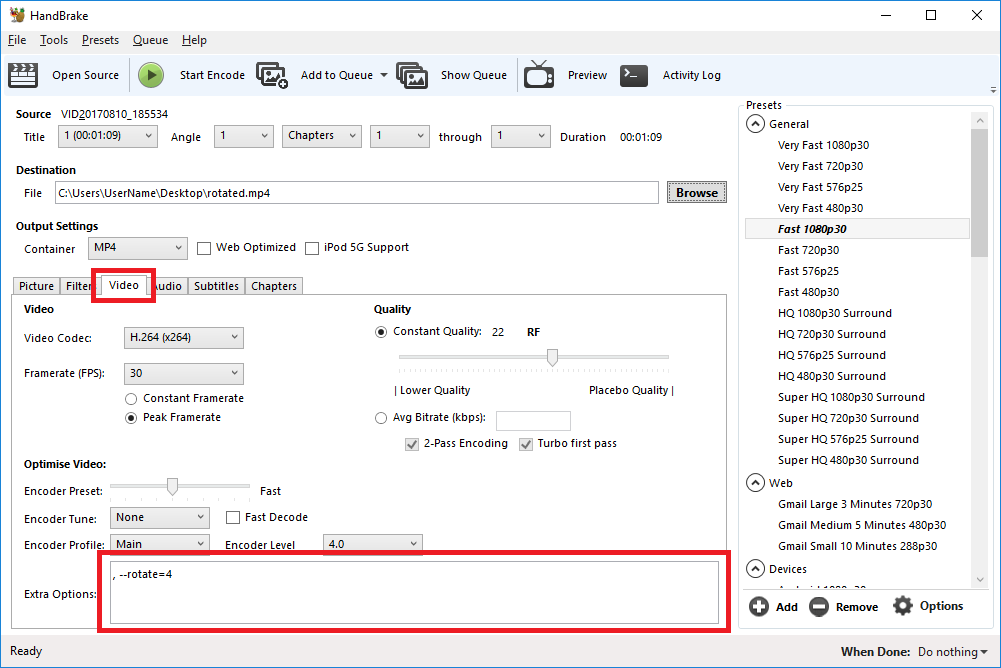
- Open the ‘Video’ tab
- We’ll be working with the ‘Extra Options’ setting.
- Once you have the required command entered, click ‘Start Encode’ to begin.
Rotate 90 degrees clockwise
To rotate 90 degrees clockwise, enter the following command into the ‘Extra Options’ setting:
, --rotate=4Rotate 90 degrees anti-clockwise
To rotate 90 degrees anti-clockwise, enter the following command into the ‘Extra Options’ setting:
, --rotate=7Rotate 180 degrees (upside down)
To rotate 180 degrees so that the video is upside down, enter the following command into the ‘Extra Options’ setting:
, --rotate=3Other options?
The official HandBrake documentation has more detail on what other options are available.
1 : x flip
2 : y flip
3 : 180 degrees rotate (also the DEFAULT)
4 : 90 degrees rotate (clockwise)
5 : 90 degrees rotate + y flip
6 : 270 degrees rotate + y flip
7 : 270 degrees rotate
Source: How to rotate and flip videos using Handbrake – IT Support Guides
Thispersondoesnotexist.com is face-generating AI at its creepiest
Nvidia’s incredible people-creating AI is now available online. Now you can create startling images of people who do not exist, to your heart’s content.
Source: Thispersondoesnotexist.com is face-generating AI at its creepiest
Speed freaks rejoice, because USB could get twice as fast
The port’s data speed is doubling today, but another doubling is possible. That would help when copying files and plugging in big monitors.
Source: Speed freaks rejoice, because USB could get twice as fast
Perfect Wi-Fi energy harvester gathers scant bounty
Wi-Fi energy harvester not useful but still might be future of power delivery.
AT&T begins testing high-speed internet over power lines
AT&T Inc has started trials in Georgia state and a non-U.S. location to deliver high-speed internet over power lines, the No. 2 wireless carrier said on Wednesday, marking its latest push to offer faster broadband service to more customers.
Source: AT&T begins testing high-speed internet over power lines
Bitcoin’s insane energy consumption, explained
One estimate suggests the Bitcoin network consumes as much energy as Denmark.
Comcast continues to inject its own code into websites you visit
Even without the repeal of net neutrality Comcast continues to show disregard for a free and open internet by inserting its own code into webpages at whim.
Source: Comcast continues to inject its own code into websites you visit
“Suspicious” event routes traffic for big-name sites through Russia
Google, Facebook, Apple, and Microsoft all affected by “intentional” BGP mishap.
Source: “Suspicious” event routes traffic for big-name sites through Russia