Welcome to the official documentation for Winutil, your go-to utility for optimizing and managing your Windows environment. Whether you’re an IT professional, power user, or regular user, Winutil provides a comprehensive set of tools to enhance your Windows experience.
Category Archives: surveillance
Introduction – OpenIPC
OpenIPC is an alternative open firmware for your IP camera.
Source: Introduction – OpenIPC
How to (locally) stream RTSP on VLC (From UniFi Protect Camera
nccgroup/TPMGenie: TPM Genie is an I2C bus interposer for discrete Trusted Platform Modules
Fix Windows 10 privacy
Source: Fix Windows 10 privacy
Hikvision Download Portal
Netherlands – http://www.hikvisioneurope.com/portal/?dir=portal
UK – http://www.hikvisioneurope.com/uk/portal/
Hikvision RTSP URL address format
If you own a Hikvision device such as an IP camera or a NVR/DVR, you can use the RTSP protocol to live stream. RTSP stands for Real Time Streaming Protocol, a network protocol for streaming the videos in real-time. Basically, it’s designed to send audio or video live from one device to another. The same RTSP url format works for Hilook devices as well.
Hikvision RTSP URL format (with Authentication)
Hikvision RTSP: rtsp:// [USER] : [PASS] @ [ADDRESS] : [RTSP PORT] /Streaming/Channels/ [CH] 0 [STREAM TYPE]
Fill in your information as follows:
- [USER] – This is the username to access your device (IP camera, NVR, DVR)
- [PASS] – This is the password to the user
- [ADDRESS] – This can be the IP address or the domain / DDNS name of your device
- [RTSP PORT] – This is the RTSP port of your device, the default is normally 554
- [CH] – This refers to the channel number that you want to pull
- [STREAM TYPE] – 0 for main stream (highest resolution), 1 for substream (low resolution, but faster)
Example 1. Local IP address
The local IP address of the device is: 192.168.1.100 and the RTSP port is 554. These are the RTSP streaming addresses:
Hikvision Main Stream: rtsp://admin:password@192.168.1.100:554/Streaming/Channels/101
Hikvision Sub Stream: rtsp://admin:password@192.168.1.100:554/Streaming/Channels/102Example 2. External IP address
The local IP address of the device is: 105.152.15.99 and the RTSP port is 554. These are the RTSP streaming addresses:
Hikvision Main Stream: rtsp://admin:password@105.152.15.99:554/Streaming/Channels/101
Hikvision Sub Stream: rtsp://admin:password@105.152.15.99:554/Streaming/Channels/102RTSP without Authentication
rtsp://<IP addressof device>:<RTSP port>/Streaming/channels/<channel number><stream number>
Note: <stream number> represents main stream(01), or the sub stream(02)Example:
rtsp://173.200.91.70:10554/Streaming/channels/101 –get the main stream of the first channel
rtsp://173.200.91.70:10554/Streaming/channels/102 –get the sub stream of the first channel
Source: Hikvision RTSP URL address format — SecurityCamCenter.com
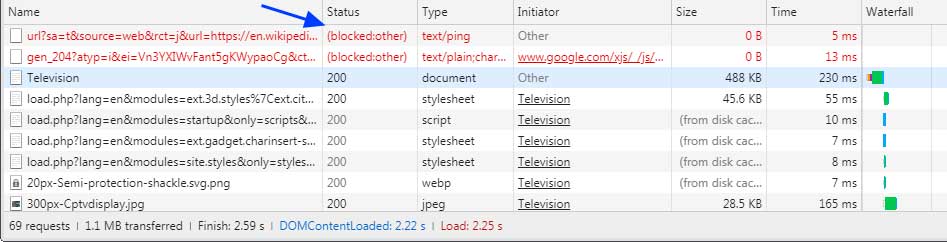
Blocking Hyperlink Auditing Tracking Pings with Extensions
With Chrome, Safari, and Edge enabling the tracking feature called Hyperlink Auditing, or Pings, by default without a way to disable them, users will need to rely on browser extensions to block them going forward.
Source: Blocking Hyperlink Auditing Tracking Pings with Extensions
What to Expect When Expecting Content Security Policy Reports
Content Security Policy (CSP) allows you to dictate a policy for content restrictions on a web site that is enforced by the browser. By setting a CSP header, can control the resources that are loaded when a visitor is viewing your website. The CSP spec allows you to build very specific policies for your site that can handle all of the different types of resources that a site might load. It is a valuable tool for protecting your site visitors.
In addition to blocking resources that violate the defined CSP, the CSP spec details a mechanism for sending reports of such violations. Monitoring these violations can help you ensure that your site is never serving content that violates your wishes whether those violations are the result of producer, developer, or hacker actions.
Source: What to Expect When Expecting Content Security Policy Reports
Hikvision Naming Rules: What do Hikvision model numbers mean? — SecurityCamCenter.com
Hikvision Naming Rules: What do Hikvision model numbers mean?
For many people Hikvision model numbers can look completely unintelligible. This guide can help you to understand the naming rules and the logic behind the Hikvision’s model numbers (for analog or IP camera, NVRs, DVR, PTZs).
The first thing to note is that the naming rules are slightly different depending on the type of product. The letters and numbers in the model tag mean different things for IP cameras, PTZ cameras or recorders. It will all become clearer shortly.
Naming rules: Hikvision IP cameras
The Hikvision IP camera range varies from dome to bullet to turret (and more) and it shares the same naming rules across models. The image below shows the possible variances.
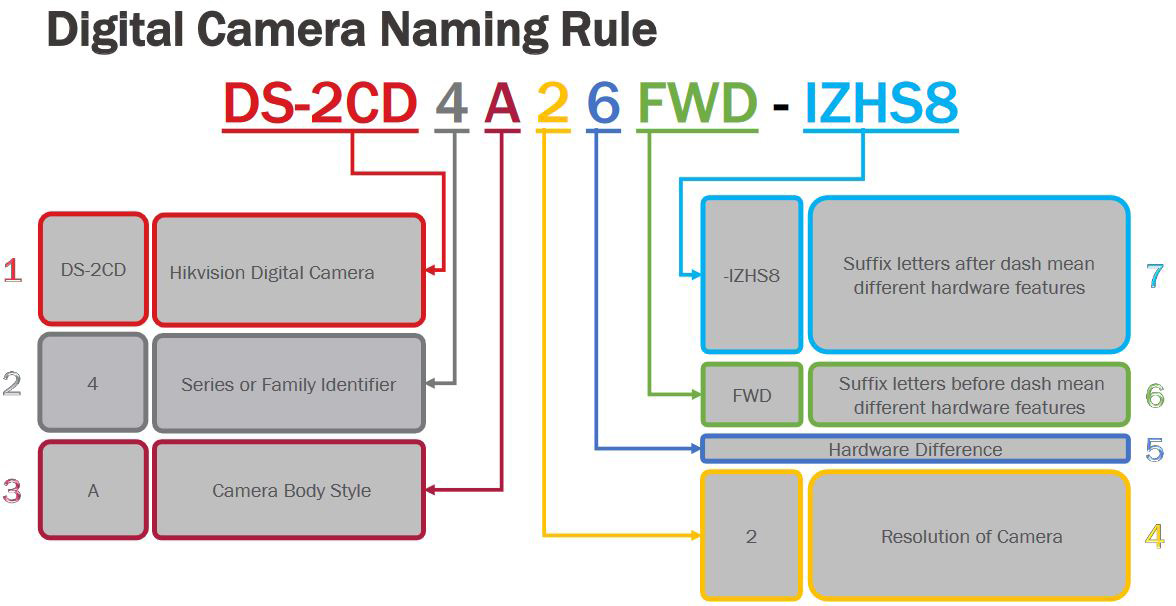
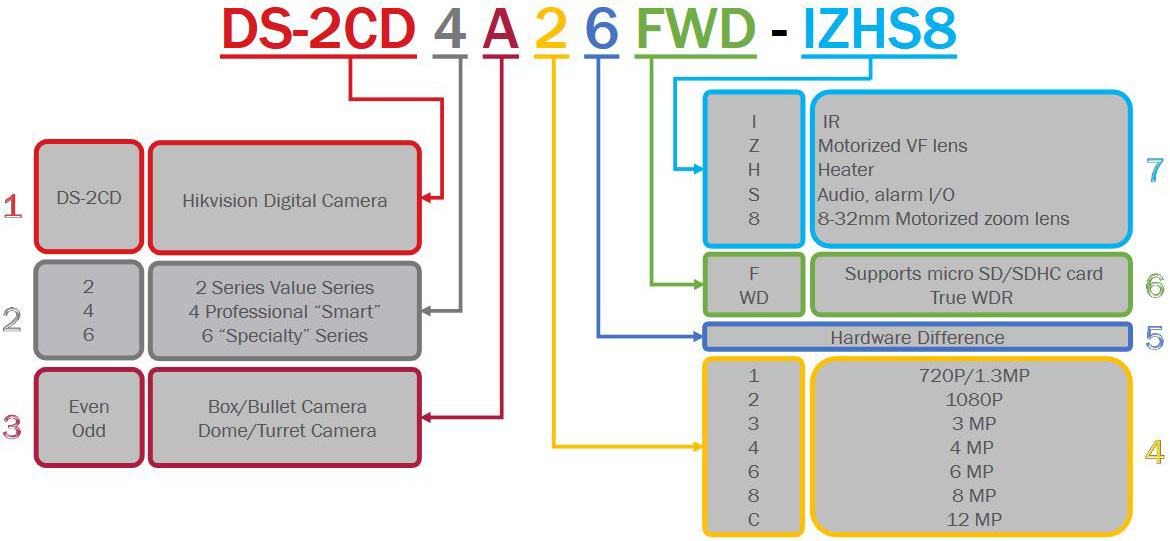
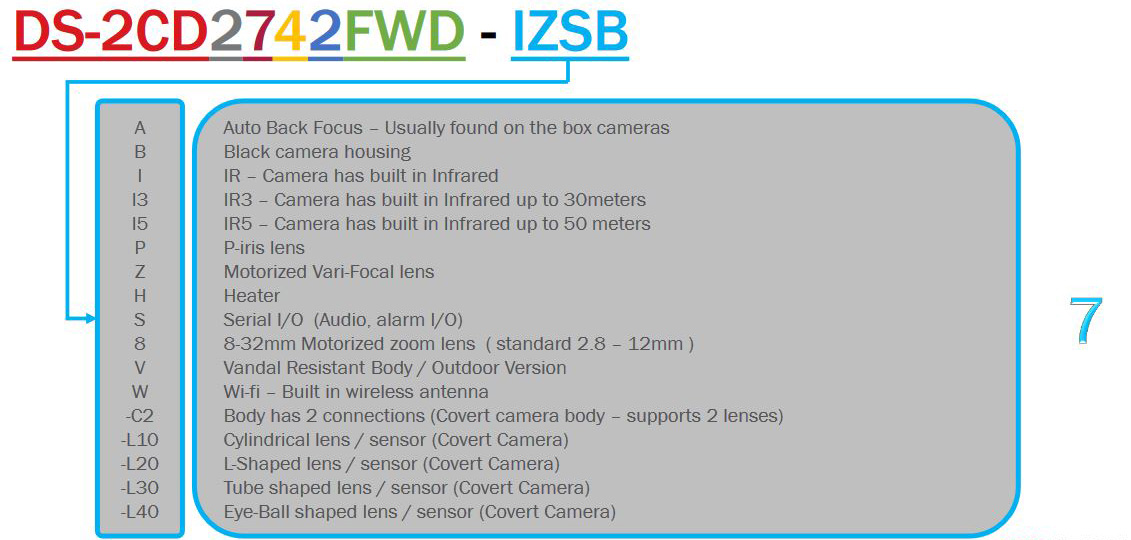
To put this into practice, DS-2CD2123G0-I is an 2MP entry level outdoor dome camera with IR. While DS-2CD2635FWD-IZS is a 3MP bullet camera with IR, motorized varifocal lens and I/O port.
Naming rules: Hikvision PTZ cameras
As PTZ cameras are more complex than regular IP ones, the naming convention is slightly different to take into account the features found only in these cameras. The image below shows the different naming possibilities:
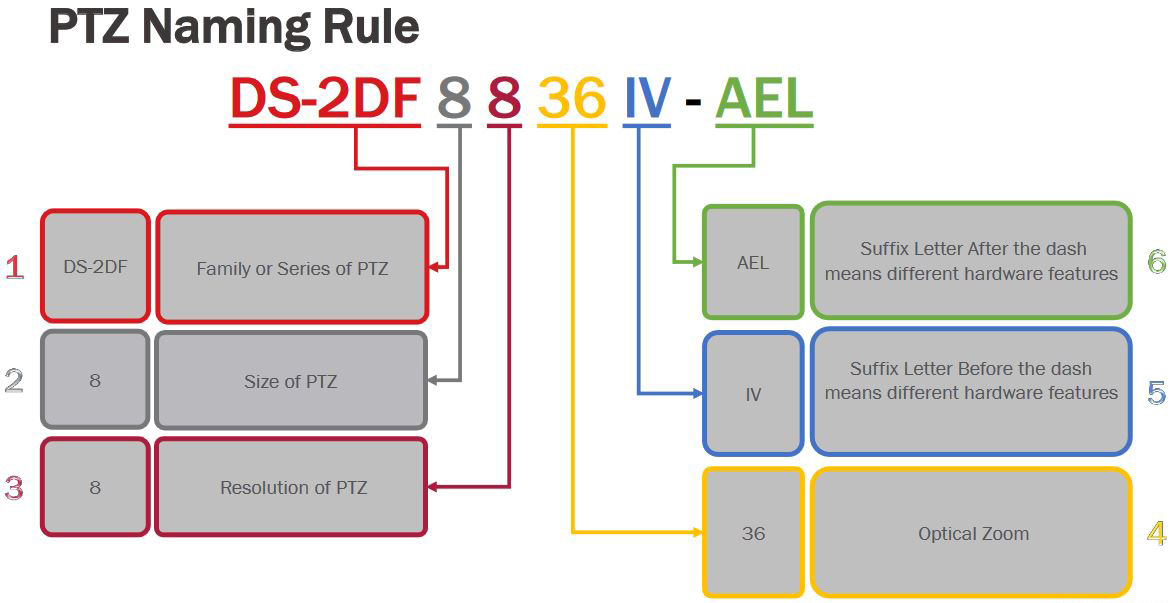
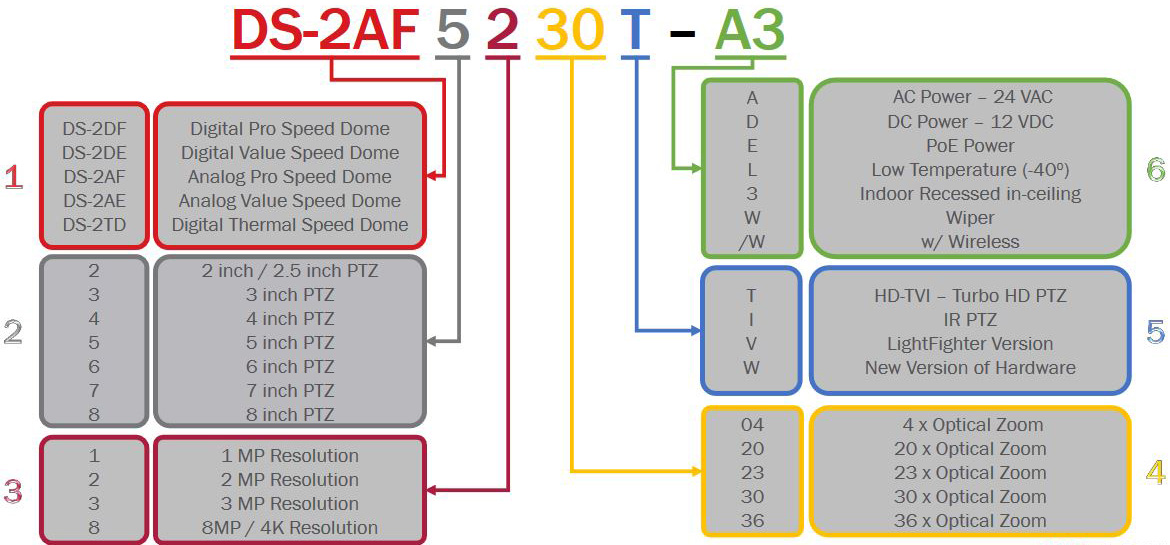
For example the DS-2DF8225IX-AELW camera is a 8” 2MP advanced PTZ camera with 25x optical zoom and IR, which can operate in low temperatures. While the DS-2DE4225IW-DE is a 4″ 2MP PTZ with 25x optical zoom.
Naming rules: Hikvision NVRs
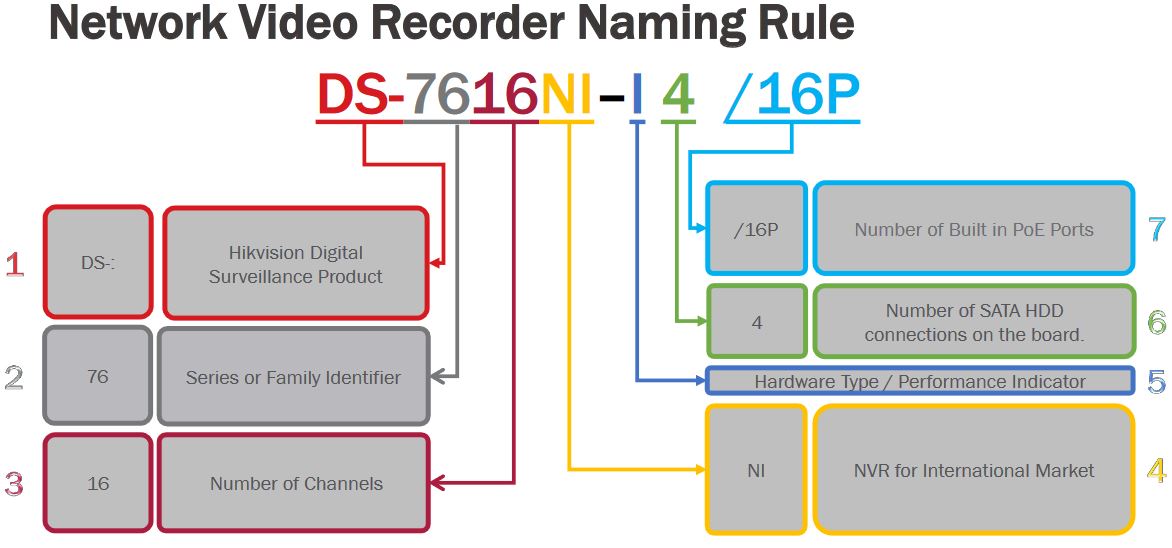
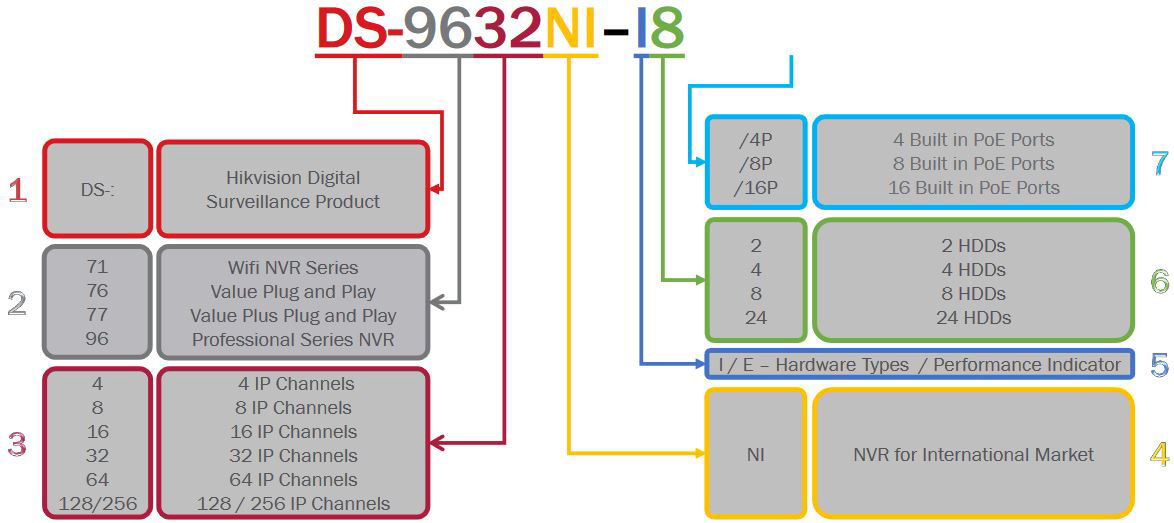
A NVR is an abbreviation Network Video Recorder and they have their own naming rules which includes important information such: the product line, the number of hard drives that can be installed, the number of channels, the megapixels supported etc. Below is the naming chart for Hikvision NVRs.
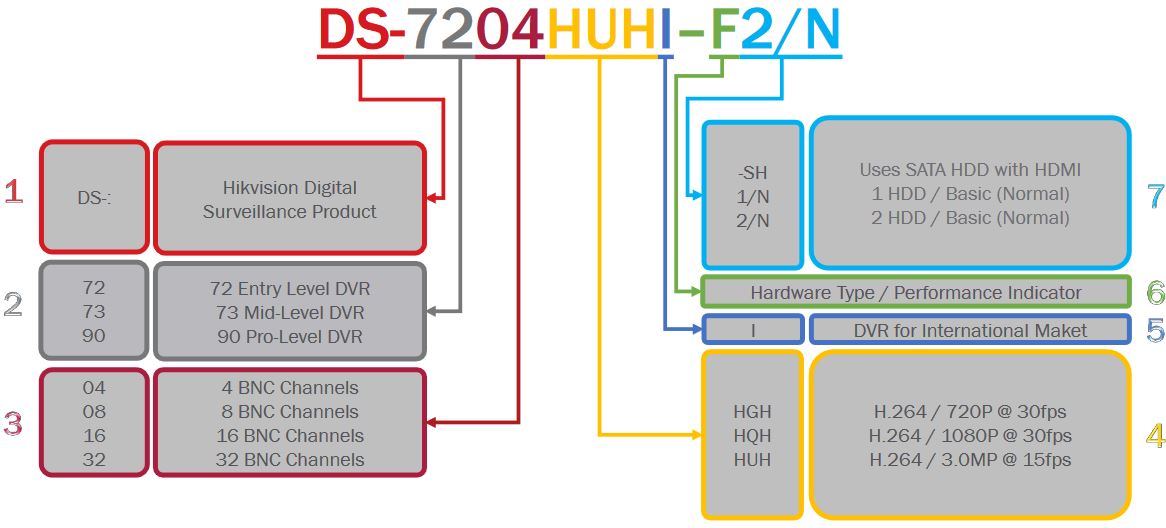
Naming rules: Hikvision DVRs
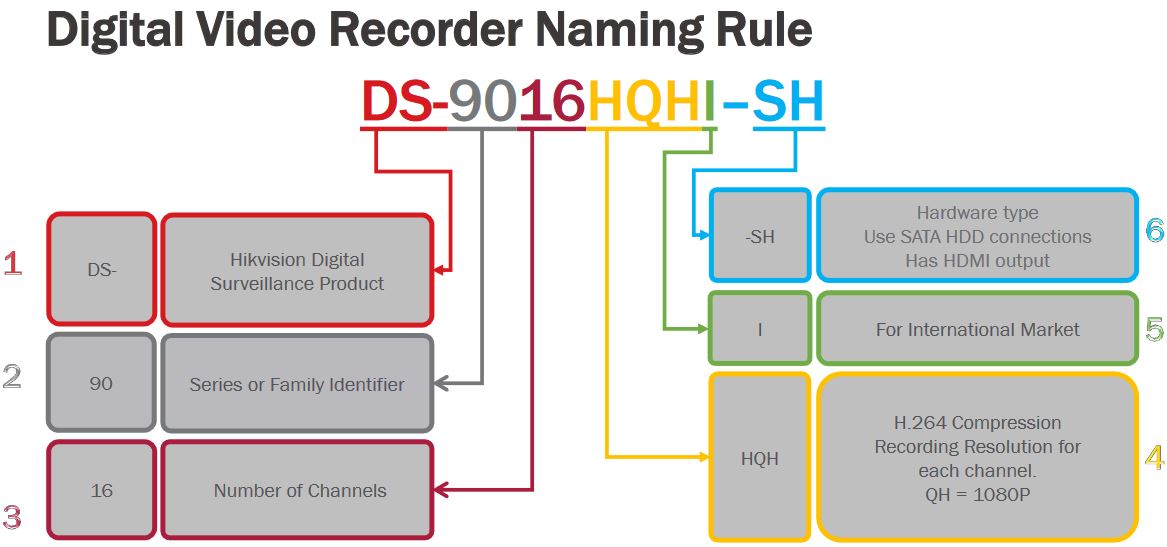
A DVR is an abbreviation Digital Video Recorder (so-called analog recorders) and they have their own naming rules which includes important information such: the product line, the number of analog cameras supported, the number of hard drives that can be installed. Below is the naming chart for Hikvision DVRs.
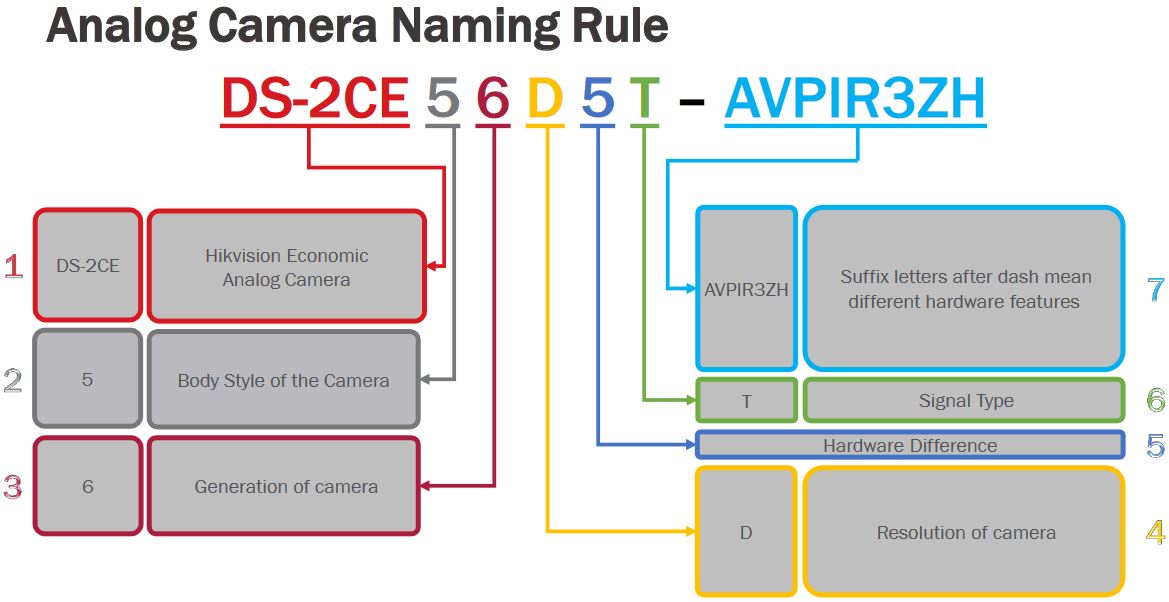
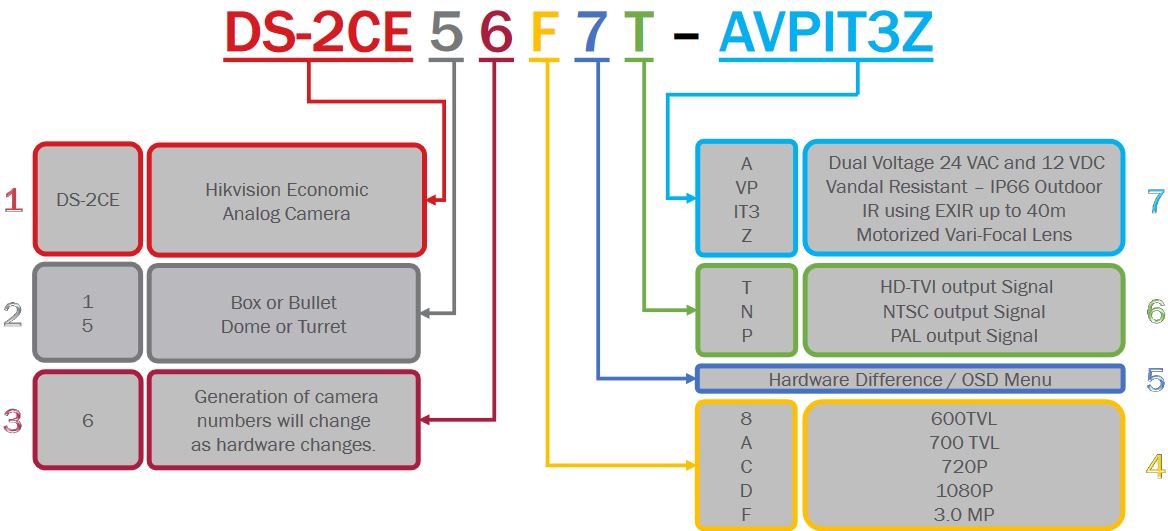
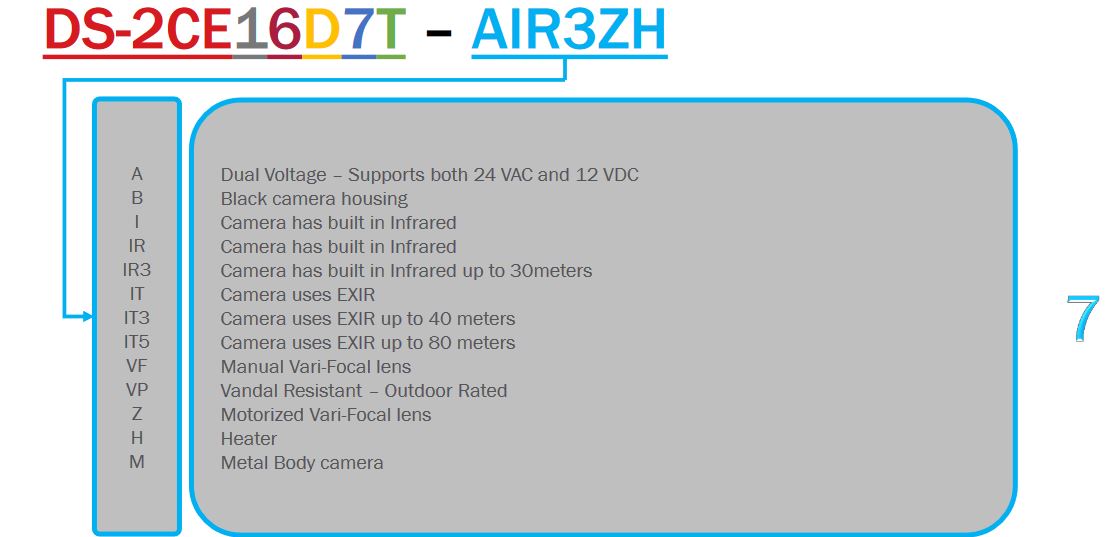
Naming rules: Hikvision Analog cameras
The Hikvision analog camera range varies from dome to bullet to turret (and more such as box cameras) and it shares the same naming rules across models. The image below shows the possible variances.
Source: Hikvision Naming Rules: What do Hikvision model numbers mean? — SecurityCamCenter.com
