Table of Contents
The SMTP Server
All email has to go through an SMTP server somewhere via a server and a port. To specify a the SMTP server to use, use a parameter called SMTPServer that allows you to specify the SMTP server to establish a connection and relay mail through. However, it is not required.
If you don’t specify a value for the SMTPServer parameter, the value stored in the $PSEmailServer preference variable will be used. You can assign a value to this variable just like you would any other variable.
PS51> $PSEmailServer = 'smtp.server.local'However, this variable does not live across PowerShell sessions. This means you must define it every time a new PowerShell session is open. For this reason, I recommend either using it by defining it above your Send-MailMessage reference or not defining it all. Instead, I’d personally provide the SMTPServer parameter value. This way you don’t have to manage an outside variable that might change on you.
PS51> Send-MailMessage -SmtpServer 'smtp.server.local'Port
By default, the value that the cmdlet will attempt to send an email through the SMTP server is port 25. This is plain, unencrypted SMTP. However, nowadays, it’s more common to send encrypted email using SSL/TLS (We’ll cover these scenarios later).
If you need to change the port from 25, you can use the Port parameter.
PS51> Send-MailMessage -SmtpServer 'smtp.server.local' -Port 587Recipients and Originators
To send an email to different recipients via methods like the To, Cc and Bcc fields, the cmdlet has various parameters to accommodate this.
The To, Cc and Bcc Parameters in the Send-Mailmessage Cmdlet
The cmdlet has three parameters each supporting multiple recipients separated by a comma called To, Cc and Bcc.
You can specify single addresses like below.
PS51> Send-MailMessage -To joe@gmail.com -Cc bob@gmail.com -Bcc susie@hotmail.com -Subject 'this is a subject'Or you can specify multiple recipients for each parameter value.
PS51> Send-MailMessage -To joe@gmail.com, tony@mycompany.local -Cc bob@gmail.com, rick@othercompany.com -Bcc susie@hotmail.com,secret@fooorg.org -Subject 'this is a subject'The From Parameter
When sending email, you can also specify the From parameter which will set the reply-to header in the email. This parameter only allows one address. Should a recipient choose to reply to the email, this will be the email address that reply will come back to.
PS51> Send-MailMessage -From me@company.org -To joe@gmail.com -Subject 'this is a subject'By default, using an email address will simply show the email address in the recipient’s FROM field. However, if you’d like to specify a name or some kind of label like Service Account Mailbox, you may also specify a name and an email like:
Adam Bertram <adbertram@gmail.com>Notice that the
Subjectparameter was used. This parameter is always required. You’ll see this parameter used in all examples.
Body
The Body parameter allows you to specify what will be in the email body. At the most simplest, you can specify any text you’d like and the cmdlet will send it via plaintext.
PS51> Send-MailMessage -From me@company.org -To joe@gmail.com -Subject 'this is a subject' -Body 'this is the body'Sending HTML Body Emails
You can also send an email body via HTML rather than plaintext. To do that, use the same Body parameter as you would with plaintext but use HTML for the string and use the BodyAsHtml switch parameter.
$body = @'
<table style="width:100%">
  <tr>
    <th>Firstname</th>
    <th>Lastname</th>
    <th>Age</th>
  </tr>
  <tr>
    <td>Jill</td>
    <td>Smith</td>
    <td>50</td>
  </tr>
  <tr>
    <td>Eve</td>
    <td>Jackson</td>
    <td>94</td>
  </tr>
</table>
'@

PS51> Send-MailMessage -From me@company.org -To joe@gmail.com -Subject 'this is a subject' -Body $body -BodyAsHtml
Notice in the above example, I enclosed the body string in
@'and'@. This is called a here string. This allows you to define long strings typically seen in email bodies that contain carriage returns. Here strings preserve formatting of strings and is a great way to define the email body especially if it’s in HTML.
Encoding
If you have special characters in the subject or body of your email, you can use the Encoding parameter. This parameter allows you to encode the email subject and body via the specified encoding type before sending.
You have a few options here:
- ASCII (default)
- UTF8
- UTF7
- UTF32
- Unicode
- BigEndianUnicode
- Default
- OEM
PS51> Send-MailMessage -From me@company.org -To joe@gmail.com -Subject 'this is a subject' -Body 'this is the body' -Encoding UTF8Attachments
The cmdlet can also attach one or more files. To do so, you can use the Attachments parameter and provide the path to the file(s) you’d like to attach.
PS51> Send-MailMessage -From me@company.org -To joe@gmail.com -Subject 'this is a subject' -Body 'this is the body' -Attachments 'C:\file.doc'You can also specify multiple attachments via a collection by separating them with a comma.
PS51> Send-MailMessage -From me@company.org -To joe@gmail.com -Subject 'this is a subject' -Body 'this is the body' -Attachments 'C:\file.doc','D:\report.xlsx'The Attachments parameter also allows you to pipe files via cmdlets like Get-Item and Get-ChildItem to the Send-MailMessage cmdlet as well.
PS51> Get-ChildItem -Path 'C:\MyFiles' | Send-MailMessage -From me@company.org -To joe@gmail.com -Subject 'this is a subject' -Body 'this is the body'Secure and Authenticated Email
By default, the cmdlet sends email via unencrypted SMTP communication over port 25. However, it also has support for sending encrypted email via SSL/TLS with a username and password.
If you attempt to relay email through an SMTP server that requires authentication, the command fails with an error message like below.
The SMTP server requires a secure connection or the client was not
authenticated. The server response was: 5.7.0 Must issue a STARTTLS command first.
To remedy this, you must first specify the port (typically 587 for TLS) and the UseSsl parameter. This tells the cmdlet to attempt to connect to port 587 on the SMTP Server and encrypt the entire message. You will typically (always?) also need to specify the username/password to authenticate to the SMTP server by using the Credential parameter.
PS51> $credential = Get-Credential
PS51> Send-MailMessage -From me@company.org -To joe@gmail.com -Subject 'this is a subject' -Body 'this is the body' -UseSsl -Port 587 -Credential $credential
Above I’m grabbing a credential (PSCredential) object using the
Get-Credentialcmdlet. This sometimes poses a problem because it’s interactive meaning it stops the script to ask for a username and password. To prevent this, you could create a PSCredential object on the fly.
A common email example is to use Gmail. Using the knowledge you’ve gained above, you can now easily send email through Gmail using the smtp.gmail.com SMTP server as shown below.
$gmailCred = Get-Credential

$sendMailParams = @{
    From = 'adbertram@gmail.com' ## Must be gmail.com
    To = 'someemail@domain.com'
    Subject = 'some subject'
    Body = 'some body'
    SMTPServer = 'smtp.gmail.com'
    SMTPPort = 587
    UseSsl = $true
    Credential = $gmailCred
}

Send-MailMessage @sendMailParams
Assigning Email Priority
Although one feature of email I personally wish would die, you can assign priority levels to the emails you send via the Priority parameter. This priority is then interpreted in various ways by the email client.
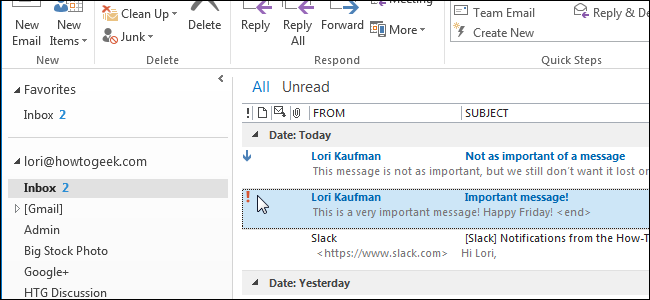
Send-mailmessage allows you to assign an email with three different priorities.
- Normal (default)
- High
- Low
PS51> Send-MailMessage -From me@company.org -To joe@gmail.com -Subject 'this is a subject' -Body 'this is the body' -Priority HighBut please, for the love of God, don’t think all of your emails are high priority!
Delivery Notifications
Finally, you can specify delivery notifications for emails. Delivery notifications are what’s typically known as read receipts in some email clients. Delivery notifications allow you to be notified if/when the email is received by the recipient. However, the recipient must still allow it.
You have four options when requesting delivery notifications.
- None (default)
- OnSuccess (when the email is delivery is successful)
- OnFailure (notify if the delivery is unsuccessful)
- Delay (when the email is delayed via an SMTP server)
You can specify a delivery notification option by using the DeliveryNotificationOptions parameter.
PS51> Send-MailMessage -From me@company.org -To joe@gmail.com -Subject 'this is a subject' -Body 'this is the body' -DeliveryNotificationsOptions 'OnSuccess'You can also request multiple delivery notifications at once by separating them with a comma.
PS51> Send-MailMessage -From me@company.org -To joe@gmail.com -Subject 'this is a subject' -Body 'this is the body' -DeliveryNotificationsOptions 'OnSuccess','OnFailure','Delay'Summary
In this post, you learned all about the Send-mailmessage cmdlet and what it can. We covered this cmdlet extensively using every parameter it has along with examples. I hope this post can server as a reference for you when using the Send-mailmessage cmdlet.
Further Reading
Be sure to check out some other related posts!