Category Archives: microsoft
How to completely uninstall Microsoft Edge on Windows 10 » OnMSFT.com
Managing the Windows Firewall with PowerShell
It is well known that you can manage the Windows Firewall with the MMC snap-in and the command line tool netsh.exe. PowerShell offers a few cmdlets that allow you in many cases to analyze and modify rules faster than the two other tools.
Configure user sign-in for Office 2013 | Microsoft Docs
Configure user sign-in for Office 2013
Applies to: Office 2013, Office 365 ProPlus
Summary: Describes how users sign in to Office 2013 and how they can set sign-in IDs.
Audience: IT Professionals
Office 2013 users can sign in by using either of two types of credentials: Microsoft account, or Organization or School. The second type of credential is the user ID that is assigned by the organization or school for the purpose of accessing Office 365. The user supplies these credentials within the user interface (UI) or, in certain cases, the credentials can be picked up from the operating system.
In this article:
- The sign-in UI
- Sign-in settings
- Single sign-on, Active Directory, and federated sign-in
The sign-in UI
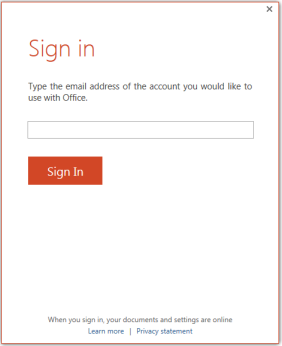
Sign-in is a two-step process that involves discovery and authentication. In the discovery step, the user enters the email address that is associated with his or her account. The Sign in user interface is shown in the following screen shot.
Figure: User interface for signing into Office
The next step is authentication.
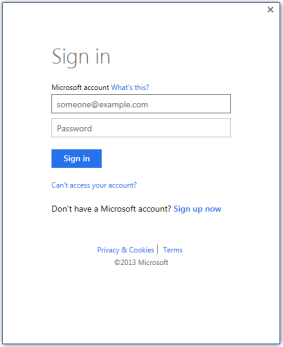
- When users enter an email address that is associated with a Microsoft account, they are taken to a Microsoft account version of the sign-in UI. The Can’t access your account? link goes to a page that contains password reset instructions.
Figure: User interface for signing into Office with a Microsoft account ID
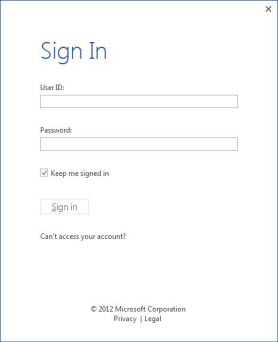
- When users enter an email account that is associated with their organization or school, they are taken to the organization version of the sign-in UI.
Figure: User interface for signing into Office with an Organization ID
Sign-in settings
You can enable one of four sign-in states by using the Block sign-in to Office Registry setting. This setting controls whether users can provide credentials to Office 2013, and whether they can use their Microsoft account or the user ID that is assigned by your organizations, or both.
The Registry key for this setting is:
HKEY_CURRENT_USER\Software\Microsoft\Office\15.0\Common\SignIn\SignInOptionsTo enable a sign-in option, set SignInOptions to a particular numeric value as shown in the following table. The type for the SignInOptions setting is DWORD. The table also describes how each selection affects users.
SignInOptions settings
SIGNINOPTIONS SETTINGS If you set SignInOptions to this… This is what it means This is the effect on users 0 Microsoft account or organization ID Users can sign in and access Office content by using their Microsoft account or one that is assigned by your organization. 1 Microsoft account only Users can sign in only by using their Microsoft account. 2 Organization only Users can sign in only by using the user ID that is assigned by your organization. This can be either a user ID in Azure Active Directory or a user ID in Active Directory Domain Services (AD DS) on Windows Server. 3 AD DS only Users can sign in only by using a user ID in Active Directory Domain Services (AD DS) on Windows Server. 4 None allowed Users can’t sign in with any ID. If you disable, or do not configure, the Block sign-in to Office setting, the default setting is 0, which means that users can sign in by using their Microsoft account or one that is assigned by your organization.
Single sign-on, Active Directory, and federated sign-in
When a user signs in to Office 2013, Office automatically tries to use the Active Directory Domain Services (AD DS) account with which the user logged into the operating system. If that Active Directory account is federated with Office 365, the customer automatically receives all the benefits of signing into Office 365 without having to perform any additional steps. For more information about federating your domain with Office 365, see Prepare for single sign-on.
Source: Configure user sign-in for Office 2013 | Microsoft Docs
Fix: Sign in feature disabled in Office 2016/2013
There is no doubt Office 2016/2013 is very well integrated with web. You can install new templates for its components, download clip art and various kind of resources needful for your documents easily in this productivity suite. You can also save your documents to cloud storage service such as OneDrive. So there are many features in Office 2016/2013, which require that you should be signed in. But what if you don’t find the sign in option or even if you find it, you receive the following message when you try to sign in:
This feature has been disabled by your administrator
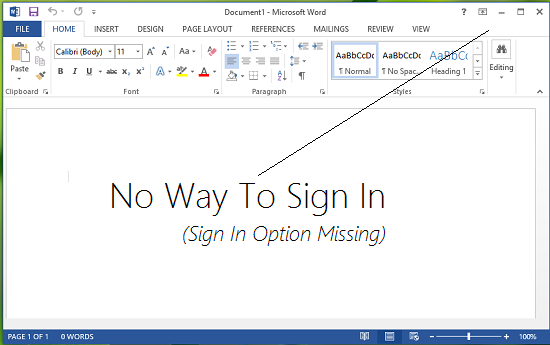
Recently, we found that on one of the Office 2013 copy we have, sign-in option at the right top of the screen is missing. In such a condition, there exists no path which could allow us to get logged in, so that we can personalize our experience with Office. In this article, we’re going to share you the fix for such an issue:
Sign in feature disabled in Office 2013/2016
1. Press Windows Key + R combination, type put Regedt32.exe in Run dialog box and hit Enter to open the Registry Editor.
2. In the left pane, navigate to following location:
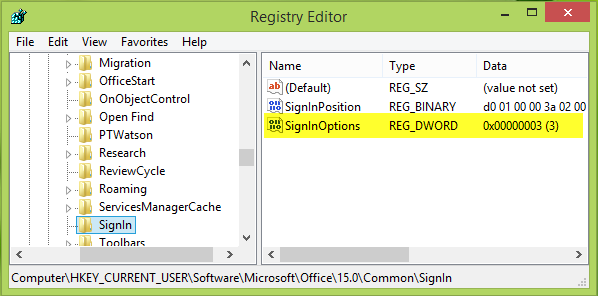
HKEY_CURRENT_USER\Software\Microsoft\Office\15.0\Common\SignIn
3. Since you’re facing the issue, in the right pane of above mentioned key, you’ll see the SignInOptions named registry DWORD (REG_DWORD). It must be showing the Value data equals to 3, double click on this DWORD to modify:
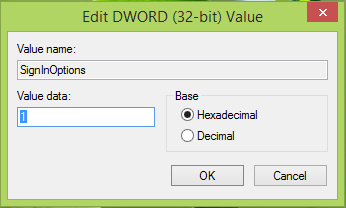
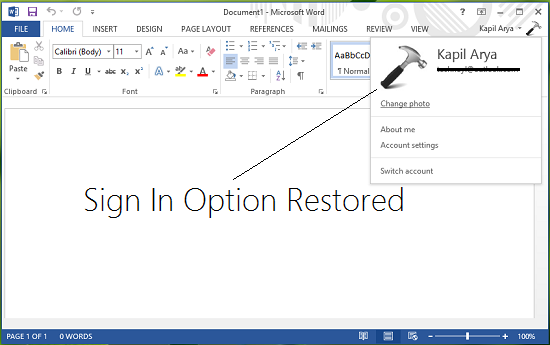
4. In the above shown box, change the Value data to 1 from 3. Click OK. If you like you can delete the same DWORD as well. Now close the Registry Editor and reboot the machine to get results. After reboot, you’ll be able to sign in to Office 2013. (See https://www.marcsiegel.us/configure-user-sign-in-for-office-2013-microsoft-docs/ )

SOLVED: How To Disable SHARE Button in Office 2016 Using a GPO – Up & Running Technologies, Tech How To’s
SOLVED: How To Disable SHARE Button in Office 2016 Using a GPO
Note: GPO templates download here.
admx admin templates need to be copied to C:\Windows\PolicyDefinitions
and the corresponding resource files (en-us) need to be copied to C:\Windows\PolicyDefinitions\en-USIf you have Office 2016 and you want to block your staff from easily saving content in the cloud, you can disable the SHARE button using the following Group Policy Object (GPO):
User Configuration -> Administrative Templates -> “Office Product Name” -> Disable Items in User Interface -> Custom -> Disable Commands > ENABLE and enter 26594
26594 does seem like a random number and it probably is, however, Microsoft has made it possible to disable nearly every feature by assigning nearly every button and short cut a number. You can get a list of those numbers from what Microsoft has cleverly named: “Office 2016 Help Files: Office Fluent User Interface Control Identifiers” which you can download directly from Microsoft HERE.
Note that you need to set each Office products rules separately; there is no global “turn off the SHARE button” GPO. That means you have to set:
User Configuration -> Administrative Templates -> Microsoft Word 2016 -> Disable Items in User Interface -> Custom -> Disable Commands > ENABLE and enter 26594
and
User Configuration -> Administrative Templates -> Microsoft Excel 2016 -> Disable Items in User Interface -> Custom -> Disable Commands > ENABLE and enter 26594
and
User Configuration -> Administrative Templates -> Microsoft PowerPoint 2016 -> Disable Items in User Interface -> Custom -> Disable Commands > ENABLE and enter 26594
and..
You can download the codes for Microsoft Office 2013 HERE and Office 2010 HERE to figure out what the codes are for Office 2010 and 2013 products. The codes are different. For example you use code 18147 to disable the SHARE button in Word 2013.


Remove Sign In box from Office apps
Method 1: You can use the Registry Editor to remove Office Sign In Option from Office 2016.
Here are the steps to follow:
1. On your computer, notebook or laptop go to your Start Screen.
2. From there press “Win + R” dedicated keyboard keys.
3. The Run box will be displayed.
4. There enter “regedit” in order to run Registry Editor.
5. on Registry go to path “HKEY_CURRENT_USER\Software\Microsoft\Office\16.0\Common\SignIn”.
6. Then, go to the right panel of Registry and right click on a blank space.
7. Select “New” and pick “DWORD Value”.
8. Name this new value “SignInOptions”.
9. Right click on the new key and set its value to 3.
10. Close Registry Editor and Reboot your Windows 7, open an Office App to check if it works.Method 2: You can use the Group Policy to remove Office Sign In Option from Office 2016.
Here are the steps to follow:
1. Download the Office 2016 Administrative Template files and install it.
After self-extracting, we can get a folder and open the admx folder inside, where you can see some language-specific folders and Office application specific admx files.
Copy the ADMX files to C:\Windows\PolicyDefinitions
Copy the adml file under the corresponding language file to the corresponding language folder in C:\Windows\PolicyDefinitions
2.Press Windows+R to open Run>type gpedit.msc > hit Enter to launch the Group Policy Editor
3.Go to this path: Local Computer Policy > User Configuration > Administrative Templates > Microsoft Office 2016 > Miscellaneous
4. You should now see the option ‘Block signing into Office‘ > double click on it
Select ‘None allowed’ to disable the sign-in option.
5. Reboot your Windows 7, open an Office App to check if it works.Note: Blocking signing in Office may affect the use of the Office cloud service.
Sysinternals Utilities – Windows Sysinternals | Microsoft Docs
Sysinternals Utilities Index
Sysinternals Suite
The entire set of Sysinternals Utilities rolled up into a single download.Sysinternals Suite for Nano Server
Sysinternals Utilities for Nano Server in a single download.Sysinternals Suite for ARM64
Sysinternals Utilities for ARM64 in a single download.AccessChk
v6.20 (November 19, 2017)
AccessChk is a command-line tool for viewing the effective permissions on files, registry keys, services, processes, kernel objects, and more.AccessEnum
v1.32 (November 1, 2006)
This simple yet powerful security tool shows you who has what access to directories, files and Registry keys on your systems. Use it to find holes in your permissions.AdExplorer
v1.44 (November 15, 2012)
Active Directory Explorer is an advanced Active Directory (AD) viewer and editor.AdInsight
v1.2 (October 26, 2015)
An LDAP (Light-weight Directory Access Protocol) real-time monitoring tool aimed at troubleshooting Active Directory client applications.AdRestore
v1.1 (November 1, 2006)
Undelete Server 2003 Active Directory objects.Autologon
v3.10 (August 29, 2016)
Bypass password screen during logon.Autoruns
v13.98 (June 24, 2020)
See what programs are configured to startup automatically when your system boots and you login. Autoruns also shows you the full list of Registry and file locations where applications can configure auto-start settings.BgInfo
v4.26 (October 19, 2018)
This fully-configurable program automatically generates desktop backgrounds that include important information about the system including IP addresses, computer name, network adapters, and more.BlueScreen
v3.2 (November 1, 2006)
This screen saver not only accurately simulates Blue Screens, but simulated reboots as well (complete with CHKDSK), and works on Windows NT 4, Windows 2000, Windows XP, Server 2003 and Windows 95 and 98.CacheSet
v1.0 (November 1, 2006)
CacheSet is a program that allows you to control the Cache Manager’s working set size using functions provided by NT. It’s compatible with all versions of NT.ClockRes
v2.1 (July 4, 2016)
View the resolution of the system clock, which is also the maximum timer resolution.Contig
v1.8 (July 4, 2016)
Wish you could quickly defragment your frequently used files? Use Contig to optimize individual files, or to create new files that are contiguous.Coreinfo
v3.31 (August 18, 2014)
Coreinfo is a new command-line utility that shows you the mapping between logical processors and the physical processor, NUMA node, and socket on which they reside, as well as the cache’s assigned to each logical processor.Ctrl2cap
v2.0 (November 1, 2006)
This is a kernel-mode driver that demonstrates keyboard input filtering just above the keyboard class driver in order to turn caps-locks into control keys. Filtering at this level allows conversion and hiding of keys before NT even “sees” them. Ctrl2cap also shows how to use NtDisplayString() to print messages to the initialization blue-screen.DebugView
v4.90 (April 23, 2019)
Another first from Sysinternals: This program intercepts calls made to DbgPrint by device drivers and OutputDebugString made by Win32 programs. It allows for viewing and recording of debug session output on your local machine or across the Internet without an active debugger.Desktops
v2.0 (October 17, 2012)
This new utility enables you to create up to four virtual desktops and to use a tray interface or hotkeys to preview what’s on each desktop and easily switch between them.Disk2vhd
v2.01 (January 21, 2014)
Disk2vhd simplifies the migration of physical systems into virtual machines (p2v.md).DiskExt
v1.2 (July 4, 2016)
Display volume disk-mappings.Diskmon
v2.01 (November 1, 2006)
This utility captures all hard disk activity or acts like a software disk activity light in your system tray.DiskView
v2.4 (March 25, 2010.md)
Graphical disk sector utility.Disk Usage (DU.md)
v1.61 (February 13, 2018)
View disk usage by directory.EFSDump
v1.02 (November 1, 2006)
View information for encrypted files.FindLinks
v1.1 (July 4, 2016)
FindLinks reports the file index and any hard links (alternate file paths on the same volume.md) that exist for the specified file. A file’s data remains allocated so long as at it has at least one file name referencing it.Handle
v4.22 (June 14, 2019)
This handy command-line utility will show you what files are open by which processes, and much more.Hex2dec
v1.1 (July 4, 2016)
Convert hex numbers to decimal and vice versa.Junction
v1.07 (July 4, 2016)
Create Win2K NTFS symbolic links.LDMDump
v1.02 (November 1, 2006)
Dump the contents of the Logical Disk Manager’s on-disk database, which describes the partitioning of Windows 2000 Dynamic disks.ListDLLs
v3.2 (July 4, 2016)
List all the DLLs that are currently loaded, including where they are loaded and their version numbers.LiveKd
v5.62 (May 16, 2017)
Use Microsoft kernel debuggers to examine a live system.LoadOrder
v1.01 (July 4, 2016)
See the order in which devices are loaded on your WinNT/2K system.LogonSessions
v1.4 (July 4, 2016)
List the active logon sessions on a system.MoveFile
v1.01 (January 24, 2013)
Allows you to schedule move and delete commands for the next reboot.NotMyFault
v4.01 (November 18, 2016)
Notmyfault is a tool that you can use to crash, hang, and cause kernel memory leaks on your Windows system.NTFSInfo
v1.2 (July 4, 2016)
Use NTFSInfo to see detailed information about NTFS volumes, including the size and location of the Master File Table (MFT) and MFT-zone, as well as the sizes of the NTFS meta-data files.PendMoves
v1.2 (February 5, 2013)
Enumerate the list of file rename and delete commands that will be executed the next boot.PipeList
v1.02 (July 4, 2016)
Displays the named pipes on your system, including the number of maximum instances and active instances for each pipe.PortMon
v3.03 (January 12, 2012)
Monitor serial and parallel port activity with this advanced monitoring tool. It knows about all standard serial and parallel IOCTLs and even shows you a portion of the data being sent and received. Version 3.x has powerful new UI enhancements and advanced filtering capabilities.ProcDump
v10.0 (September 17, 2020)
This command-line utility is aimed at capturing process dumps of otherwise difficult to isolate and reproduce CPU spikes. It also serves as a general process dump creation utility and can also monitor and generate process dumps when a process has a hung window or unhandled exception.Process Explorer
v16.32 (April 28, 2020)
Find out what files, registry keys and other objects processes have open, which DLLs they have loaded, and more. This uniquely powerful utility will even show you who owns each process.Process Monitor
v3.60 (September 17, 2020)
Monitor file system, Registry, process, thread and DLL activity in real-time.PsExec
v2.2 (June 29, 2016)
Execute processes on remote systems.PsFile
v1.03 (June 29, 2016)
See what files are opened remotely.PsGetSid
v1.45 (June 29, 2016)
Displays the SID of a computer or a user.PsInfo
v1.78 (June 29, 2016)
Obtain information about a system.PsKill
v1.16 (June 29, 2016)
Terminate local or remote processes.PsPing
v2.01 (January 29, 2014)
Measure network performance.PsList
v1.4 (June 29, 2016)
Show information about processes and threads.PsLoggedOn
v1.35 (June 29, 2016)
Show users logged on to a system.PsLogList
v2.8 (June 29, 2016)
Dump event log records.PsPasswd
v1.24 (June 29, 2016)
Changes account passwords.PsService
v2.25 (June 29, 2016)
View and control services.PsShutdown
v2.52 (December 4, 2006)
Shuts down and optionally reboots a computer.PsSuspend
v1.07 (June 29, 2016)
Suspend and resume processes.PsTools
v2.45 (July 4, 2016)
The PsTools suite includes command-line utilities for listing the processes running on local or remote computers, running processes remotely, rebooting computers, dumping event logs, and more.RAMMap
v1.51 (May 31, 2018)
An advanced physical memory usage analysis utility that presents usage information in different ways on its several different tabs.RegDelNull
v1.11 (July 4, 2016)
Scan for and delete Registry keys that contain embedded null-characters that are otherwise undeleteable by standard Registry-editing tools.Registry Usage (RU.md)
v1.2 (July 4, 2016)
View the registry space usage for the specified registry key.RegJump
v1.1 (April 20, 2015)
Jump to the registry path you specify in Regedit.SDelete
v2.01 (February 13, 2018)
Securely overwrite your sensitive files and cleanse your free space of previously deleted files using this DoD-compliant secure delete program.ShareEnum
v1.6 (November 1, 2006)
Scan file shares on your network and view their security settings to close security holes.ShellRunas
v1.01 (February 28, 2008)
Launch programs as a different user via a convenient shell context-menu entry.Sigcheck
v2.80 (June 24, 2020)
Dump file version information and verify that images on your system are digitally signed.Streams
v1.6 (July 4, 2016)
Reveal NTFS alternate streams.Strings
v2.53 (July 4, 2016)
Search for ANSI and UNICODE strings in binary images.Sync
v2.2 (July 4, 2016)
Flush cached data to disk.Sysmon
v12.0 (September 17, 2020)
Monitors and reports key system activity via the Windows event log.TCPView
v3.05 (July 25, 2011)
Active socket command-line viewer.VMMap
v3.26 (June 11, 2019)
VMMap is a process virtual and physical memory analysis utility.VolumeId
v2.1 (July 4, 2016)
Set Volume ID of FAT or NTFS drives.Whois
v1.20 (December 11, 2019)
See who owns an Internet address.WinObj
v2.22 (February 14, 2011)
The ultimate Object Manager namespace viewer is here.ZoomIt
v4.52 (December 11, 2019)
Presentation utility for zooming and drawing on the screen.
Source: Sysinternals Utilities – Windows Sysinternals | Microsoft Docs
How to Uninstall Edge Chromium When Windows 10 Won’t Let You

Edge Chromium is a decent web browser. I’d even go as far as to say it’s worth swapping over to from Google Chrome, given its improvements with memory usage. However, Microsoft has been incredibly annoying about stuffing Edge Chromium down everyone’s throats, and a recent Windows update locks this browser into your OS even more.
Sure, you could just set another app like Firefox or Opera as your default web browser and ignore Edge’s presence (and Windows 10’s incessant notifications to “try the new Edge”), but it’s better to remove Edge Chromium entirely if you never plan to use it.
The thing is, if you try to uninstall the browser from the Apps & Features menu in system settings, the “Uninstall” button next to Edge is now grayed out. If you’re like me, you probably hopped over to the Control Panel to uninstall it via the “Programs and Features” tab…except the update also removed Edge from the list of installed programs, so it can’t be uninstalled that way, either.
There’s a reason for this: some Microsoft apps require Edge to run properly, so Microsoft made it harder to uninstall Edge to avoid unnecessary issues that could be caused by its absence (and it just really wants you to use Edge).
This doesn’t mean Edge Chromium has to take up permanent residence on your computer—you’ll just have to get a little more creative to delete it. And no, you won’t break Windows by uninstalling Edge, though if all you intend to do is disable it and set a different browser as your default app, we’ll show you how to do that, too.
How to disable Edge and set a different default browser

Given Windows 10’s bug-ridden history and the OS’s reliance on Edge, it may be safer to just switch to a new browser instead of uninstalling it completely.
- Open the Start Menu
- Click Settings and go to Apps > Default apps.
- Scroll down and click “Web browser.”
- Select the browser you want to use, which you’ll obviously need to have first installed in order to make the switch. Check our lists for the best browsers for ad-blocking and the best browsers for privacy if you need recommendations.
- You can also unpin Edge from your taskbar by right-clicking the taskbar icon and selecting “Unpin from taskbar.”
This will hide Edge most of the time, but Windows will still occasionally suggest using the browser, and some apps will open links in Edge even after changing the default program—but you can delete it from your PC if those behaviors bug you.
How to uninstall Edge Chromium
Despite Microsoft’s efforts to prevent users from delete Edge, you can uninstall it from Windows 10 with some simple PowerShell wizardry. We’ll cover two possible options just in case one doesn’t work for you.
Method one:

- Open Windows File Explorer
- Type “C:\Program Files (x86)\Microsoft\Edge\Application” into the address bar and hit Enter. This should open the Edge installation folder—if not, try navigating to the folder manually, or search for “Edge” in File Explorer.
- There should be a folder with a numerical name. The name is the same as the current version of Edge installed on your PC. For example, at the time of writing, the folder on my machine is “83.0.478.58.” Open that folder.
- Find and open the “Installer” folder.
- In this folder, click the “File” tab in the upper-left of the File Explorer window, then go to File > Open Windows PowerShell > Open Windows PowerShell as administrator.
- Click “Yes” when prompted to allow the program to make changes to your system.
- Type
.\setup.exe -uninstall -system-level -verbose-logging -force-uninstallinto PowerShell and press Enter to run the command and let it run.
Assuming everything went according to plan, Edge should now be uninstalled. However, if this method doesn’t work for you, there’s another option you can try.
Method 2:

- Search for “PowerShell” from the taskbar or Windows Start menu.
- Right-click “Windows PowerShell” from the search results and select “Run as an administrator.”
- Select “Yes” when asked if the program is allowed to make changes to your system.
- In the PowerShell window, type
get-appxpackage *edge*and press Enter. - Several lines of information will show up. Look for “PackageFullName” and copy the text in the column.
- Type
remove-appxpackageinto PowerShell and paste the text you copied from the PackafeFullName column. - Press Enter to run the command. Edge should now be removed from your system.
This story was updated to add more information on why Microsoft is preventing the browser from being removed, plus two additional methods for removing/disabling the browser.
Source: How to Uninstall Edge Chromium When Windows 10 Won’t Let You