In this post, I collected all Group Policy settings that are related to privacy in Windows 10. I will update the list when I receive new information. Please
Source: Windows 10 privacy – All Group Policy settings – 4sysops
In this post, I collected all Group Policy settings that are related to privacy in Windows 10. I will update the list when I receive new information. Please
Source: Windows 10 privacy – All Group Policy settings – 4sysops
1) Open Settings
2) In the “Find a setting” search box, type Device Manager
3) Open Device Manager
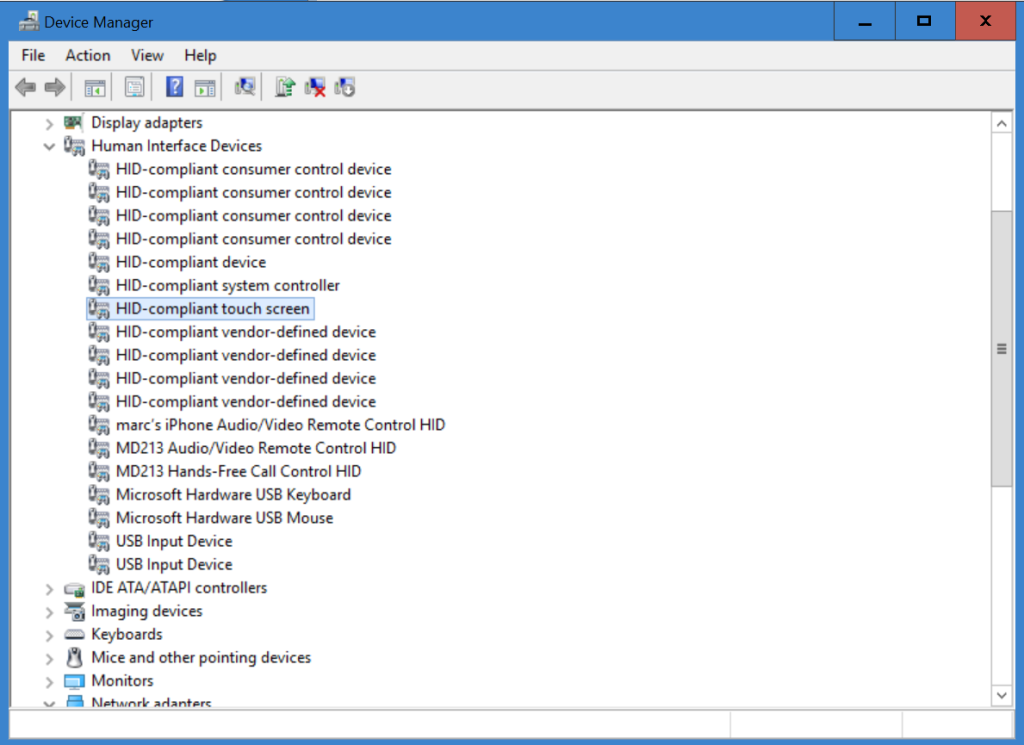
4) Find the Human Interface Drivers item, and double click it to expand the list.
5) Click on HID-Compliant touch screen, then RIGHT CLICK it and choose Disable from the context menu.
6) Click Yes.
7) Close Device Manager and Settings. You’re done.
Thanks to a new feature in Windows 10 version 1511, you can now postpone or pause Windows 10 upgrades and updates. You don’t have to be an IT pro to use Windows Update for Business (although it helps), but you’ll need a business edition of Windows 10. I’ve got the details here.
Source: How to take control of Windows 10 updates and upgrades (even if you don’t own a business) | ZDNet
Over the last month or so I’ve had loads of emails about the Windows Update reboot nag screen. Basically, people think that it’s a pain in the rear and want to know if there’s a way to get rid of it or at least customize it
Source: Take control of the Windows Update reboot nag screen | ZDNet
20,000 samples found impersonating apps from Twitter, Facebook, and others.
Source: New type of auto-rooting Android adware is nearly impossible to remove | Ars Technica
Most commonly shared data for Android is e-mail addresses; for iOS, it’s GPS data.
Source: User data plundering by Android and iOS apps is as rampant as you suspected
From 1892 to 1925, Augustus Sherman, the chief registry clerk of Ellis Island, took photographs of immigrants as they arrived in the United States. The photographs are striking for their display of the vast array of cultural backgrounds that passed through on their way to becoming citizens of the U.S. Take a look at some of the history contained in this archive.
Source: Photos Show Immigrants as They Arrived on Ellis Island | Fstoppers
Comcast is using the Verizon network to test wireless service
Source: Comcast is planning to test a wireless network using Verizon’s spectrum
Windows 10 shares a lot of personal data with Microsoft, but you can turn most of it off.
Source: Windows 10 doesn’t offer much privacy by default: Here’s how to fix it [Updated]