How to Allow Users to Install Software without Admin Rights in Windows 10
An admin account on a Windows PC enjoys more privileges than any other account types. This account can install apps and make modifications to the system easily without too many steps. However, sometimes you may want to enable allow users to install software without admin rights in Windows 10. It’s totally cool and possible for you. The following guide will demonstrate multiple ways to do that.
Method 1: Change Your Standard Account to Admin Account to Install Programs
One of the ways to be able to install program without admin rights in Windows 10 is to convert your standard user account to an administrator account on your PC. You can ask your administrator to do this for you by following the following steps:
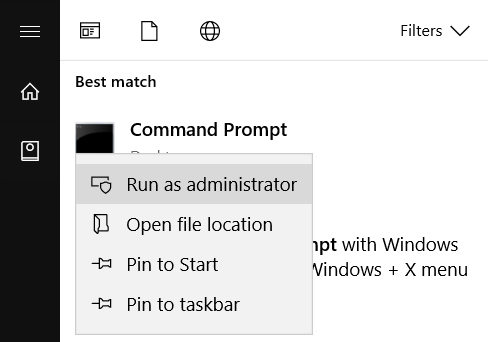
Open the Start Menu, search for Command Prompt, right-click on it and select Run as administrator.
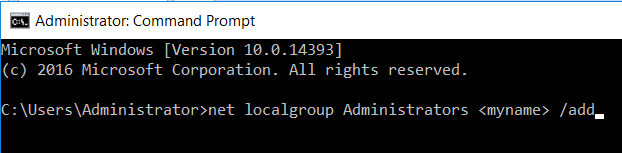
When the command prompt window opens, type in the following command and hit enter. Make sure to replace myname with the username of the account you’re converting to an admin account.
net localgroup Administrators <myname> /add
The account should instantly be converted to an admin account and you should then be able to install programs on your Windows 10 machine.
Source: Guide for Allowing Users to Install Programs without Admin Password in Windows 10