Category Archives: Win10
Disable KeyLogger Windows 10 : Windows10
dmwappushservice
[Tip] How to Disable Windows Defender SmartScreen Filter in Windows 10 – AskVG
[Tip] How to Disable Windows Defender SmartScreen Filter in Windows 10 – “SmartScreen Filter” is a feature of Windows 8, Windows 8.1 and Windows 10 operating systems which has been implemented to improve safety and security of your
Source: [Tip] How to Disable Windows Defender SmartScreen Filter in Windows 10 – AskVG
Permanently Disable & Prevent Automatic Restart of Windows Update in Windows 10 – Tech Journey
Ubuntu Linux is available in the Windows Store
[Tip] How to Uninstall Mixed Reality Portal in Windows 10 – AskVG
HKEY_CURRENT_USER\Software\Microsoft\Windows\CurrentVersion\Holographic
Source: [Tip] How to Uninstall Mixed Reality Portal in Windows 10 – AskVG
Hide & Remove OneDrive from Windows 10 File Explorer Navigation Pane Folder Tree – Tech Journey
OneDrive is pesky and sticky in File Explorer of Windows 10. The navigation pane (also known as side panel or folder tree) displays OneDrive folder prominently, just after the Quick Access. If you just want to hide […]
Source: Hide & Remove OneDrive from Windows 10 File Explorer Navigation Pane Folder Tree – Tech Journey
How to *disable* automatic reboots in Windows 10? – Super User
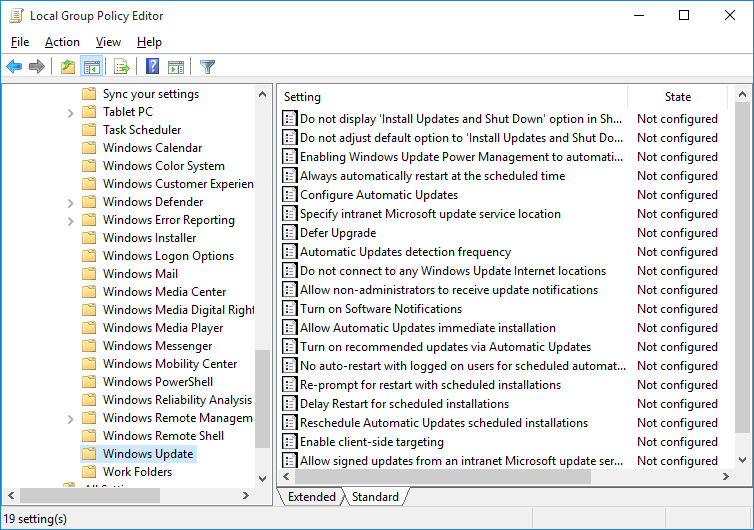
sleep – Conclusively stop wake timers from waking Windows 10 desktop – Super User
Problem Windows suffers from hand-holding, and every iteration has exacerbated the problem. Windows 10 attracted controversy upon release for forcing home users to update regularly and making user
Source: sleep – Conclusively stop wake timers from waking Windows 10 desktop – Super User
How to Disable Cortana in Windows 10’s Anniversary Update
Microsoft doesn’t want you to disable Cortana. You used to be able to turn Cortana off in Windows 10, but Microsoft removed that easy toggle switch in the Anniversary Update. But you can still disable Cortana via a registry hack or group policy setting. This transforms the Cortana box into a “Search Windows” tool for local application and file searches.
Source: How to Disable Cortana in Windows 10’s Anniversary Update