Category Archives: Uncategorized
DreamStation Clinician Setup Instructions
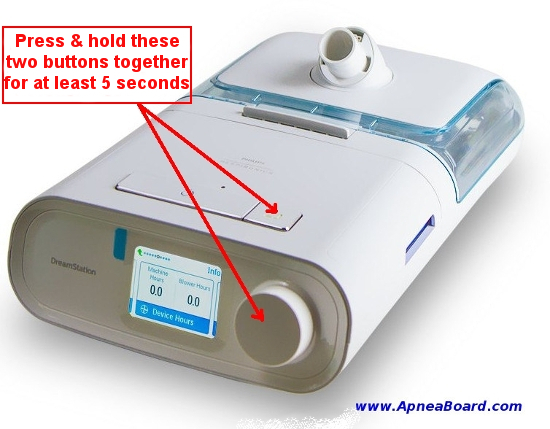
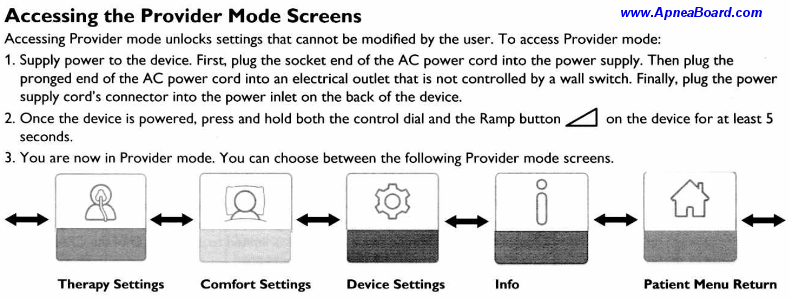
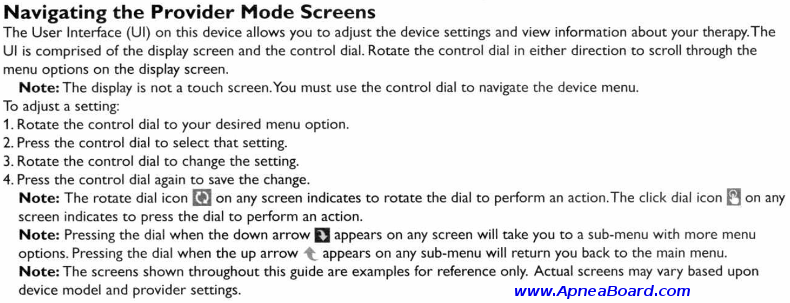
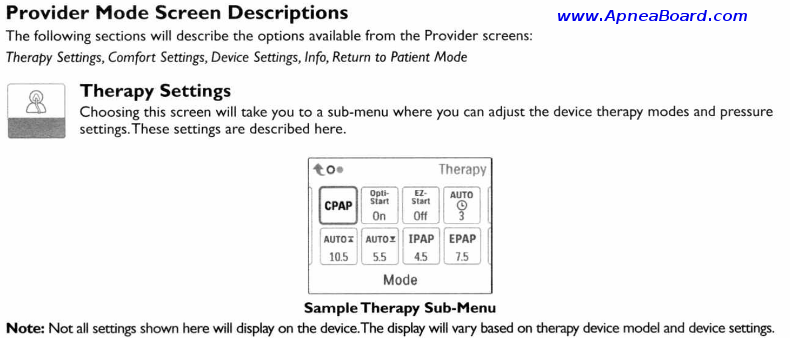
Instructions for entering the CPAP Setup / Clinician Menu of the
Philips-Respironics DreamStation Series CPAP Machines
(should work for all DreamStation machines, including the DreamStation Auto BiPAP, DreamStation BiPAP Pro, DreamStation Auto CPAP, DreamStation CPAP Pro, & DreamStation CPAP machines)
To get the detailed Clinician Setup Guide for your CPAP Machine CLICK HERE
For instructions on how to set the optimum pressure on your CPAP Machine, CLICK HERE
~ Entering the Clinician Setup Mode ~
(You must first plug in and power up your machine)
For more details, you may request the detailed Clinician Setup Guide for your DreamStation Machine HEREFor more information, or if you have questions regarding your Philips-Respironics DreamStation machine, please join the Apnea Board Forum and post your question there. We’d love to help you!
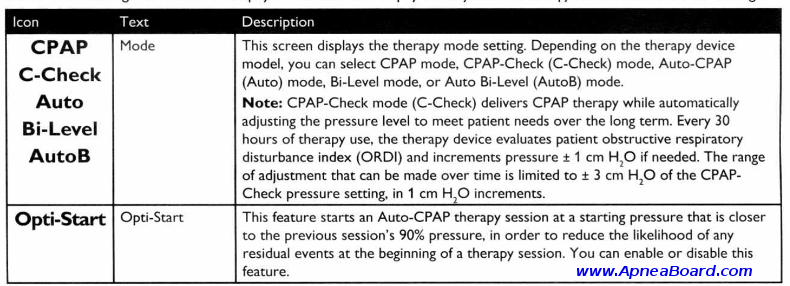
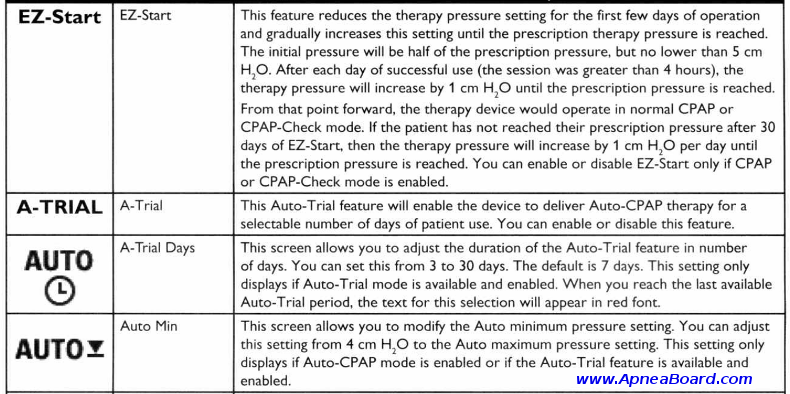
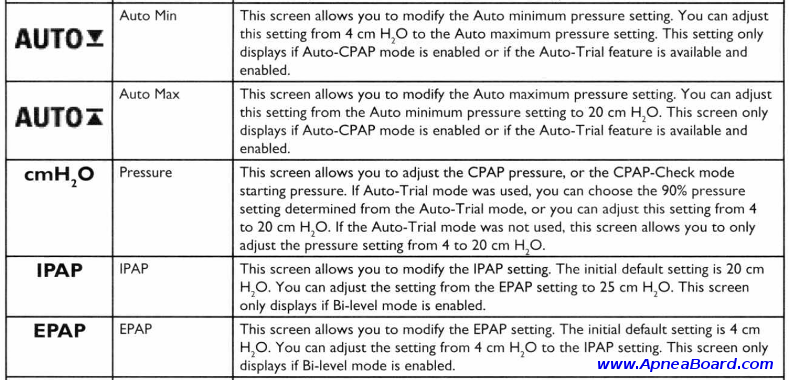
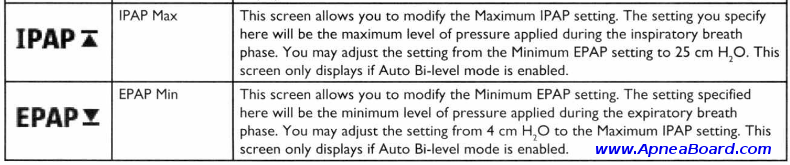
Unminify
This tool will unminify, reformat and reindent ugly JavaScript, CSS, HTML, XML and JSON code, making it readable again.
Source: Unminify
Call Popups – Zulu UC – Documentation
Forward call to cell with caller ID – FreePBX – FreePBX Community Forums
Amazon Order History Reports
https://www.amazon.com/gp/b2b/reports/
Homeland Security details new tools for extracting device data at US borders
The agency says it can now obtain details including your phone’s location history, social media information, and photos and videos.
Source: Homeland Security details new tools for extracting device data at US borders
sound – Can I downmix stereo audio to mono? – Ask Ubuntu | https://askubuntu.com/
- Find the name of your audio sink by running
pacmd list-sinks | grep name:- Then run this command (taking care to remove the angled brackets):
pacmd load-module module-remap-sink sink_name=mono master=name_of_audio sink_given_by_previous_command channels=2 channel_map=mono,monoor add
load-module module-remap-sink sink_name=mono master=name_of_audio sink_given_by_previous_command channels=2 channel_map=mono,monoto
/etc/pulse/default.pato have it run at startup.- Then in Sound Preferences choose “Mono” as the output, but remember to reduce volumes by half, since two channels are getting mixed into one, or else you’ll have distortion. To test, run:
speaker-test -c 2 -t sineSame thing in a single command:
pacmd load-module module-remap-sink sink_name=mono master=$(pacmd list-sinks | grep -m 1 -oP 'name:\s<\K.*(?=>)') channels=2 channel_map=mono,mono
- To remove the mono channel, just use:
pacmd unload-module module-remap-sink
Source: sound – Can I downmix stereo audio to mono? – Ask Ubuntu | https://askubuntu.com/
How to Create A Custom BuddyPress Members Directory
Block Ads & Malvertising on pfSense Using pfBlockerNG (DNSBL)
This walkthrough uses the DNSBL portion of pfBlockerNG to remove ads/advertising and more importantly, malvertising. It essentially creates a functionality similar to the pi-Hole project except it doesn’t require a separate piece of hardware. Instead, you just use your pfSense + pfBlockerNG! If you’re interested in a write-up on installing/configuring the pi-hole on Ubuntu, I have one here. Please note this walkthrough is for the devel version of pfBlockerNG. The pfBlockerNG-devel package is in the standard list of available packages…
Source: Block Ads & Malvertising on pfSense Using pfBlockerNG (DNSBL)