How to force all traffic through OpenVPN
Add the following directive to the server configuration file:
push “redirect-gateway def1”
If your VPN setup is over a wireless network, where all clients and the server are on the same wireless subnet, add the local flag:
push “redirect-gateway local def1”
Pushing the redirect-gateway option to clients will cause all IP network traffic originating on client machines to pass through the OpenVPN server. The server will need to be configured to deal with this traffic somehow, such as by NATing it to the internet, or routing it through the server site’s HTTP proxy.
If you want to configure this on the client side, put
redirect-gateway def1in your client.ovpn file.
Category Archives: Privacy
Blocking Hyperlink Auditing Tracking Pings with Extensions
With Chrome, Safari, and Edge enabling the tracking feature called Hyperlink Auditing, or Pings, by default without a way to disable them, users will need to rely on browser extensions to block them going forward.
Source: Blocking Hyperlink Auditing Tracking Pings with Extensions
keepassxc/GettingStarted.adoc at develop · keepassxreboot/keepassxc
Remove Sign In box from Office apps
Method 1: You can use the Registry Editor to remove Office Sign In Option from Office 2016.
Here are the steps to follow:
1. On your computer, notebook or laptop go to your Start Screen.
2. From there press “Win + R” dedicated keyboard keys.
3. The Run box will be displayed.
4. There enter “regedit” in order to run Registry Editor.
5. on Registry go to path “HKEY_CURRENT_USER\Software\Microsoft\Office\16.0\Common\SignIn”.
6. Then, go to the right panel of Registry and right click on a blank space.
7. Select “New” and pick “DWORD Value”.
8. Name this new value “SignInOptions”.
9. Right click on the new key and set its value to 3.
10. Close Registry Editor and Reboot your Windows 7, open an Office App to check if it works.Method 2: You can use the Group Policy to remove Office Sign In Option from Office 2016.
Here are the steps to follow:
1. Download the Office 2016 Administrative Template files and install it.
After self-extracting, we can get a folder and open the admx folder inside, where you can see some language-specific folders and Office application specific admx files.
Copy the ADMX files to C:\Windows\PolicyDefinitions
Copy the adml file under the corresponding language file to the corresponding language folder in C:\Windows\PolicyDefinitions
2.Press Windows+R to open Run>type gpedit.msc > hit Enter to launch the Group Policy Editor
3.Go to this path: Local Computer Policy > User Configuration > Administrative Templates > Microsoft Office 2016 > Miscellaneous
4. You should now see the option ‘Block signing into Office‘ > double click on it
Select ‘None allowed’ to disable the sign-in option.
5. Reboot your Windows 7, open an Office App to check if it works.Note: Blocking signing in Office may affect the use of the Office cloud service.
airodump-ng [Aircrack-ng]
Source: airodump-ng [Aircrack-ng]
Preferences — Firefox Source Docs documentation
Preferences
Telemetry behaviour is controlled through the mozconfig defines and preferences listed here.
mozconfig Defines
MOZ_TELEMETRY_REPORTING
When Defined (which it is for official builds):
- If
RELEASE_OR_BETAis not defined, definesMOZ_TELEMETRY_ON_BY_DEFAULTWhen Not Defined:
- If
datareporting.healthreport.uploadEnabledis locked, we print a message in the Privacy settings that you cannot turn on data submission and disabled the checkbox so you don’t try.- Android: hides the data submission UI to prevent users from thinking they can turn it on
- Disables Telemetry from being sent (due to
Telemetry::IsOfficialTelemetry)
MOZ_TELEMETRY_ON_BY_DEFAULT
When Defined:
- Android: enables
toolkit.telemetry.enabled
MOZ_SERVICES_HEALTHREPORT
When Defined (which it is on most platforms):
- Sets
datareporting.healthreport.{infoURL|uploadEnabled}inmodules/libpref/init/all.js.
MOZ_DATA_REPORTING
When Defined (which it is when
MOZ_TELEMETRY_REPORTING,MOZ_SERVICES_HEALTHREPORT, orMOZ_CRASHREPORTERis defined (so, on most platforms, but not typically on developer builds)):
- Enables
app.shield.optoutstudies.enabledWhen Not Defined:
- Disables
app.shield.optoutstudies.enabled- Removes the Data Collection Preferences UI in
privacy.xhtml
MOZILLA_OFFICIAL
When Not Defined (defined on our own external builds and builds from several Linux distros, but not typically on defeloper builds):
- Disables Telemetry from being sent (due to
Telemetry::IsOfficialTelemetry)
MOZ_UPDATE_CHANNEL
When not
releaseorbeta:
- If
MOZ_TELEMETRY_REPORTINGis also defined, definesMOZ_TELEMETRY_ON_BY_DEFAULTWhen
beta:
- If
toolkit.telemetry.enabledis otherwise unset at startup,toolkit.telemetry.enabledis defaulted totrue(this is irrespective ofMOZ_TELEMETRY_REPORTING)When
nightlyorauroraorbetaordefault:
- Desktop: Locks
toolkit.telemetry.enabledtotrue. All other values forMOZ_UPDATE_CHANNELon Desktop lockstoolkit.telemetry.enabledtofalse.- Desktop: Defaults
Telemetry::CanRecordExtended(and, thusTelemetry::CanRecordReleaseData) totrue. All other values ofMOZ_UPDATE_CHANNELon Desktop defaults these tofalse.
DEBUG
When Defined:
- Disables Telemetry from being sent (due to
Telemetry::IsOfficialTelemetry)
In Short:
For builds downloaded from mozilla.com
MOZ_TELEMETRY_REPORTINGis defined,MOZ_TELEMETRY_ON_BY_DEFAULTis on if you downloaded Nightly or Developer Edition,MOZ_SERVICES_HEALTHREPORTis defined,MOZ_DATA_REPORTINGis defined,MOZILLA_OFFICIALis defined,MOZ_UPDATE_CHANNELis set to the channel you downloaded, andDEBUGis false. This means Telemetry is, by default, collecting some amount of information and is sending it to Mozilla.For builds you make yourself with a blank mozconfig,
MOZ_UPDATE_CHANNELis set todefaultand everything else is undefined. This means Telemetry is, by default, collecting an extended amount of information but isn’t sending it anywhere.
Preferences
toolkit.telemetry.unified
This controls whether unified behavior is enabled. If true:
- Telemetry is always enabled and recording base data.
- Telemetry will send additional
mainpings.It defaults to
true, but isfalseon Android (Fennec) builds.
toolkit.telemetry.enabled
If
unifiedis off, this controls whether the Telemetry module is enabled. It can be set or unset via the Preferences dialog in Firefox for Android (Fennec). Ifunifiedis on, this is locked totrueifMOZ_UPDATE_CHANNELisnightlyorauroraorbetaordefault(which is the default value ofMOZ_UPDATE_CHANNELfor developer builds). Otherwise it is locked tofalse. This controls a diminishing number of things and is intended to be deprecated, and then removed.
datareporting.healthreport.uploadEnabled
If
unifiedis true, this controls whether we send Telemetry data. Ifunifiedis false, we don’t use this value.
toolkit.telemetry.archive.enabled
Allow pings to be archived locally. This can only be enabled if
unifiedis on.
toolkit.telemetry.server
The server Telemetry pings are sent to. Change requires restart.
toolkit.telemetry.log.level
This sets the Telemetry logging verbosity per
Log.jsm. The available levels, in descending order of verbosity, areTrace,Debug,Config,Info,Warn,ErrorandFatalwith the default beingWarn.By default logging goes only the console service.
toolkit.telemetry.log.dump
Sets whether to dump Telemetry log messages to
stdouttoo.
toolkit.telemetry.shutdownPingSender.enabled
Allow the
shutdownping to be sent when the browser shuts down, from the second browsing session on, instead of the next restart, using the ping sender.
toolkit.telemetry.shutdownPingSender.enabledFirstSession
Allow the
shutdownping to be sent using the ping sender from the first browsing session.
toolkit.telemetry.firstShutdownPing.enabled
Allow a duplicate of the
mainshutdown ping from the first browsing session to be sent as a separatefirst-shutdownping.
toolkit.telemetry.newProfilePing.enabled
Enable the “new-profile” ping on new profiles.
toolkit.telemetry.newProfilePing.delay
Controls the delay after which the “new-profile” ping is sent on new profiles.
toolkit.telemetry.updatePing.enabled
Enable the “update” ping on browser updates.
toolkit.telemetry.maxEventSummaryKeys
Set the maximum number of keys per process of the Event Summary keyed scalars. Default is 500. Change requires restart.
toolkit.telemetry.eventping.enabled
Whether the “event” ping is enabled. Default is true except for GeckoView where it defaults to false. Change requires restart.
toolkit.telemetry.eventping.eventLimit
The maximum number of event records permitted in the “event” ping. Default is 1000.
toolkit.telemetry.eventping.minimumFrequency
The minimum frequency at which an “event” ping will be sent. Default is 60 (minutes).
toolkit.telemetry.eventping.maximumFrequency
The maximum frequency at which an “event” ping will be sent. Default is 10 (minutes).
toolkit.telemetry.ecosystemtelemetry.enabled
Whether Ecosystem Telemetry is enabled. Default is false. Change requires restart.
toolkit.telemetry.overrideUpdateChannel
Override the
channelvalue that is reported via Telemetry. This is useful for distinguishing different types of builds that otherwise still report as the same update channel.
toolkit.telemetry.ipcBatchTimeout
How long, in milliseconds, we batch accumulations from child processes before sending them to the parent process. Default is 2000 (milliseconds).
toolkit.telemetry.pioneerId
If a user has opted into the Pioneer program, this will contain their Pioneer ID.
toolkit.telemetry.prioping.enabled
Whether the “prio” ping is enabled. Defaults to true. Change requires restart.
toolkit.telemetry.prioping.dataLimit
The number of encoded prio payloads which triggers an immediate “prio” ping with reason “max”. Default is 10 payloads.
Data-choices notification
toolkit.telemetry.reportingpolicy.firstRun
This preference is not present until the first run. After, its value is set to false. This is used to show the infobar with a more aggressive timeout if it wasn’t shown yet.
datareporting.policy.firstRunURL
If set, a browser tab will be opened on first run instead of the infobar.
datareporting.policy.dataSubmissionEnabled
This is the data submission master kill switch. If disabled, no policy is shown or upload takes place, ever.
datareporting.policy.dataSubmissionPolicyNotifiedTime
Records the date user was shown the policy. This preference is also used on Android.
datareporting.policy.dataSubmissionPolicyAcceptedVersion
Records the version of the policy notified to the user. This preference is also used on Android.
datareporting.policy.dataSubmissionPolicyBypassNotification
Used in tests, it allows to skip the notification check.
datareporting.policy.currentPolicyVersion
Stores the current policy version, overrides the default value defined in TelemetryReportingPolicy.jsm.
datareporting.policy.minimumPolicyVersion
The minimum policy version that is accepted for the current policy. This can be set per channel.
datareporting.policy.minimumPolicyVersion.channel-NAME
This is the only channel-specific version that we currently use for the minimum policy version.
GeckoView
toolkit.telemetry.geckoview.streaming
Whether the GeckoView mode we’re running in is the variety that uses the GeckoView Streaming Telemetry API or not. Defaults to false.
toolkit.telemetry.geckoview.batchDurationMS
The duration in milliseconds over which GeckoView Streaming Telemetry will batch accumulations before passing it on to its delegate. Defaults to 5000.
toolkit.telemetry.geckoview.maxBatchStalenessMS
The maximum time (in milliseconds) between flushes of the GeckoView Streaming Telemetry batch to its delegate. Defaults to 60000.
Testing
The following prefs are for testing purpose only.
toolkit.telemetry.initDelay
Delay before initializing telemetry (seconds).
toolkit.telemetry.minSubsessionLength
Minimum length of a telemetry subsession and throttling time for common environment changes (seconds).
toolkit.telemetry.collectInterval
Minimum interval between data collection (seconds).
toolkit.telemetry.scheduler.tickInterval
Interval between scheduler ticks (seconds).
toolkit.telemetry.scheduler.idleTickInterval
Interval between scheduler ticks when the user is idle (seconds).
toolkit.telemetry.idleTimeout
Timeout until we decide whether a user is idle or not (seconds).
toolkit.telemetry.modulesPing.interval
Interval between “modules” ping transmissions.
toolkit.telemetry.send.overrideOfficialCheck
If true, allows sending pings on unofficial builds. Requires a restart.
toolkit.telemetry.testing.overridePreRelease
If true, allows recording opt-in Telemetry on the Release channel. Requires a restart.
toolkit.telemetry.untrustedModulesPing.frequency
Interval, in seconds, between “untrustedModules” ping transmissions.
toolkit.telemetry.healthping.enabled
If false, sending health pings is disabled. Defaults to true.
toolkit.telemetry.testing.disableFuzzingDelay
If true, ping sending is not delayed when sending between 0am and 1am local time.
toolkit.telemetry.testing.overrideProductsCheck
If true, allow all probes to be recorded no matter what the current product is.
all-thunderbird.js – mozsearch
Thunderbird pref settings
Source: all-thunderbird.js – mozsearch
SharpApp | Mirinsoft ❤︎
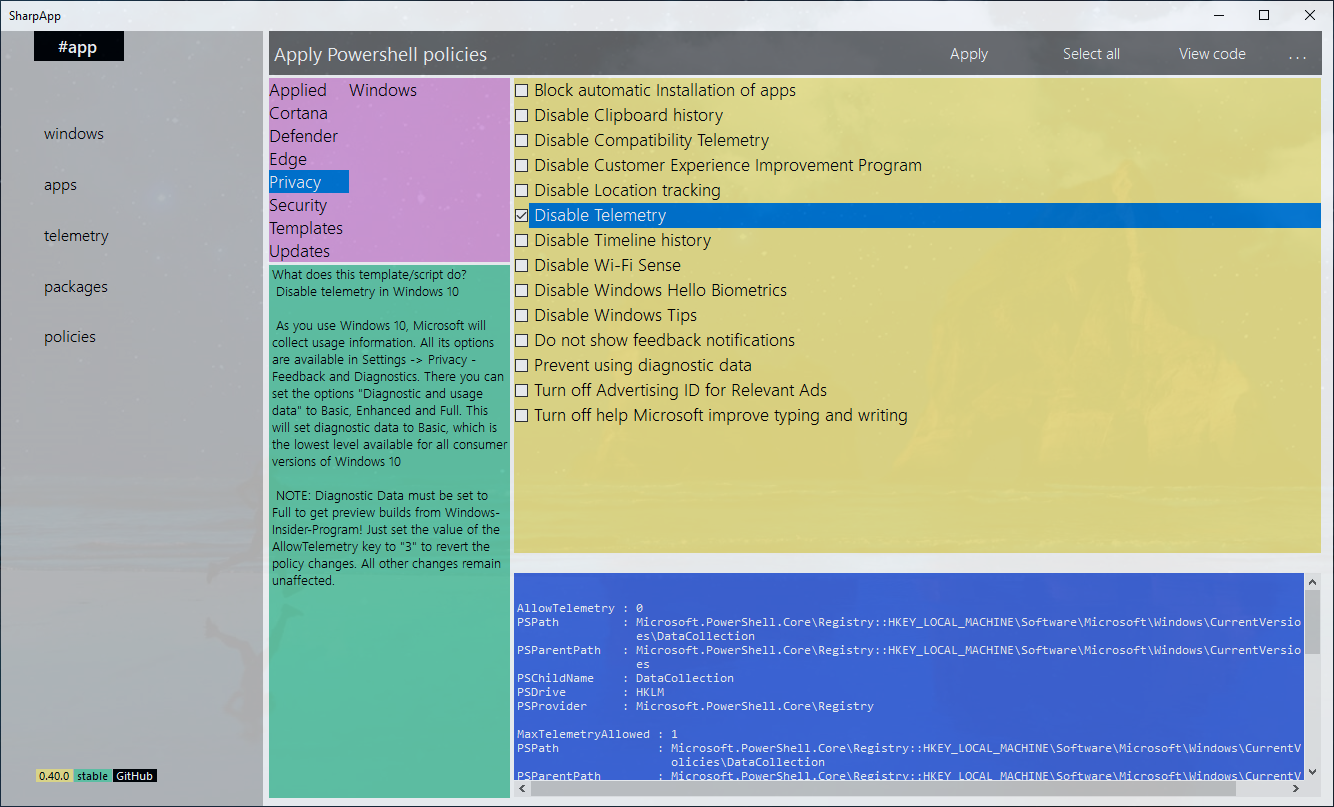 Source: SharpApp | Mirinsoft ❤︎
Firefox/Normandy/PreferenceRollout – MozillaWiki
Normandy Pref Rollout is a feature that allows Mozilla to change the default value of a preference for a targeted set of users, without deploying an update to Firefox. This document focuses on the use of Pref Rollout as a mechanism to enable feature flagging in Firefox.
How to: Turn Off Telemetry in Windows 7, 8, and Windows 10
If you’d rather not participate in helping improve the Windows operating system, you can turn of Telemetry services completely.
Source: How to: Turn Off Telemetry in Windows 7, 8, and Windows 10