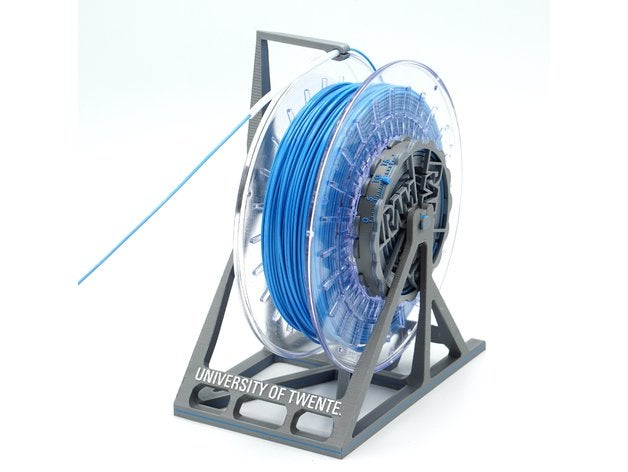
 Filament load/unload issues? MMU2 taking too much space? Not with this Universal Auto-Rewind spool holder! It keeps filament on the spool during unloading, up to four full revolutions. Video compilation This is a remake of the Original and Parametric Auto-Rewind Spool Holder, but with significant enhancements: Slipping point of the clutch can be adjusted in about 15 steps using the dial. One size fits almost all spools up to 1kg. Inner diameter 30-75 mm, max outer diameter 200 mm, max width 88 mm. Hubs for wider spools can be created with the customizer, same for hubs with narrow diameters. Stand for 3kg spools available here. Spring (v1 and v1.01) works both ways around: towards the axle and towards the outer rim. Note: flipping the direction requires re-calibration of the clutch tension! Spring v1.02+ and 3.x are direction independent, can be flipped around without changes in clutch tension. These versions might also be better protected against spring overloading. If the clutch slips too much then you can put ducttape or electrical tape on the outer rim of the spring, this slows down the slipping action. Spring should be printed with 0.2 mm layer thickness to match the gaps in the structures (see assembly instructions). All other parts can be printed in any layer thickness, 0.2 mm is default. GCode for Prusa i3 MK2/S and MK3(S) /MM(S) can be downloaded here: single color and multi-material. The MM version uses two colors for most parts (three for the stand). First color is the base color (silver grey in shown examples), second color is for decals and markers (vibrant color), third color is for the characters on the stand (white). The parts are designed such that missing layers in the 2nd and 3rd color do not affect the structural strength of all parts, also the number of color changes is kept to a minimum. Four spring styles are available: SpringFlat is to be used with a 3-D printed axle with flat side. SpringRound (available in zip file) is used with a round axle (e.g. metal rod). SpringRound has an anti-rotation block which aligns with the frame, so it is not needed to immobilize the round axle. Both SpringFlat and SpringRound come in two different stiffnesses. The soft version is recommended to start with and the stiff version can be used when more torque is needed. The hub thread length can be customized with the Parametric Auto-Rewind Spool Holder customizer. Use output=”hub”, hubThreaded=”yes”, set hubThreadLength to the desired length and leave all other parameters at its default settings. At Robotics and Mechatronics (RaM), University of Twente some research is done on variable stiffness actuators. Certain mechanisms in this Auto-Rewind Spool Holder were (loosely) inspired by our research there. One side of the stand reads “It’s Rewind Time” while the other side reads “University of Twente”. A stand with no text (blank) is also available. A list of (mostly) compatible stands are on the Parametric Auto-Rewind Spool Holder page. Additional stands, mods and alternative auto-rewinding systems developed by the awesome community: Stands Table/wall/ceilingAutoRewind Spool Stand Hanging Screw Mount (table/wall/ceiling, use SpringRound)Screw-down tabletop, wall, and ceiling mounted stands (table/wall/ceiling, needs different axle)Wall Mount Spool Rewinder Adapter (wall)Wall mount (wall)Strong wall mount (wall)The MMU2s Prusa Final Filament Rewind Solution (wall)Numbered filament stands (table)Multiple Mechanism stand (table)Ceiling or under shelf hanging mount (ceiling) HangersAutorewind HangerHanging bracketHanging holderWire shelving mountHanger for 1×2 wood shelves 2020 series structural framing2020 Top mount, high2020 Top mount, low2020 Side mount2020 Side mount alternative Ikea furnitureIkea Lack table sliding spooler standMMU Spoolholder for Stuva / Besta (for parametric rewinder, check size)MMU V2 Autorewind Spoolholder for IKEA Samla BOX (for parametric rewinder, check size) Spannerhands dry boxAdapter for Spannerhands Spool SystemSpannerHands dual-color hub Printer specificPrusa i3 MK3 top stand, narrowPrusa i3 MK3 top stand, 1 mm bigger In case the narrow one does not fitStand for Wanhao Duplicator i3Anet A8 top stand Rewinder systems Vincent’s Auto-Rewind Spool HoldersOriginal Auto-Rewind Spool HolderParametric Auto-Rewind Spool HolderUniversal Auto-Rewind Spool Holder (this thing)Sisyphus Auto-Rewind Spool Holder (gravity-based)Integrated Auto-Rewind Spool Holder Rewinders by other designersStand and hub for 3kg spoolsYet another rewinding spoolholder Uses rubber O-ringsRemixed spoolholder Narrower, new tube holderUniversal Auto-Rewind Spindle Parametric rewinder with threaded rod and nutsRepRewind Fits inside the RepBox containerWall-mount Auto-rewind Spool ThingParametric Hangable Any-Direction Continuous Slip ClutchCircular Gravity-based Auto-Rewind Spool HolderLinear Gravity-based Auto-Rewind Spool HolderPrusa i3 top mount roller-style gravi
Source: Universal Auto-Rewind Spool Holder by VincentGroenhuis
There are two great vacuum hose adapters that are tied into the customizer but I wanted to make some shapes that were even more customizable. Onshape (which is cloud based CAD software) is free to use for public files so I thought that would be the best software to use. I made some templates: 4” m to DW straight reducer https://goo.gl/flzXUD 4” f to DW straight reducer https://goo.gl/kEJYsq 1.875” f to DW straight reducer https://goo.gl/2HKPRN 1.875” f straight coupling https://goo.gl/g93fjr 1.875” m straight coupling https://goo.gl/GgjqWr 1.875” f elbow coupling https://goo.gl/HUqKgb And also made a video showing how to modify the templates and how to model a hose adapter from scratch:https://www.youtube.com/watch?v=b-8ZF1DM4_E If any one needs any more templates or shapes, please let me know and I’ll try to keep the list up to date. Have fun!