All posts by smarc
Topic: How to Get User Profile Data · BuddyPress.org
During a recent project, I needed to get certain User Profile Data to be used. This was used outside any loops and not on the Profile page. Hopefully this will help others seeking the same information.
To obtain the default data (such as User ID, User Login, ect) use the following:
`global $bp;
$the_user_id = $bp->loggedin_user->userdata->ID;
$the_user_login = $bp->loggedin_user->userdata->user_login;`Userdata values include:
ID
user_login
user_pass (this is encrypted MD5 Hash)
user_nicename
user_email
user_url
user_registered
user_activation_key
user_status
display_nameTo get field data from extended profile fields for the current logged in user, use the following:
`$the_first_name = bp_get_profile_field_data(‘field=First Name&user_id=’.bp_loggedin_user_id());
/* Change field name to the one you added to the profile, or if you know the field’s #, you can use that instead. */
Source: Topic: How to Get User Profile Data · BuddyPress.org
Mythbuntu Control Panel – MythTV Official Wiki
Channel Scanning – MythTV Official Wiki
Raspberry Pi Performance: Add ZRAM and these Kernel Parameters
Darktable resources
Source: resources
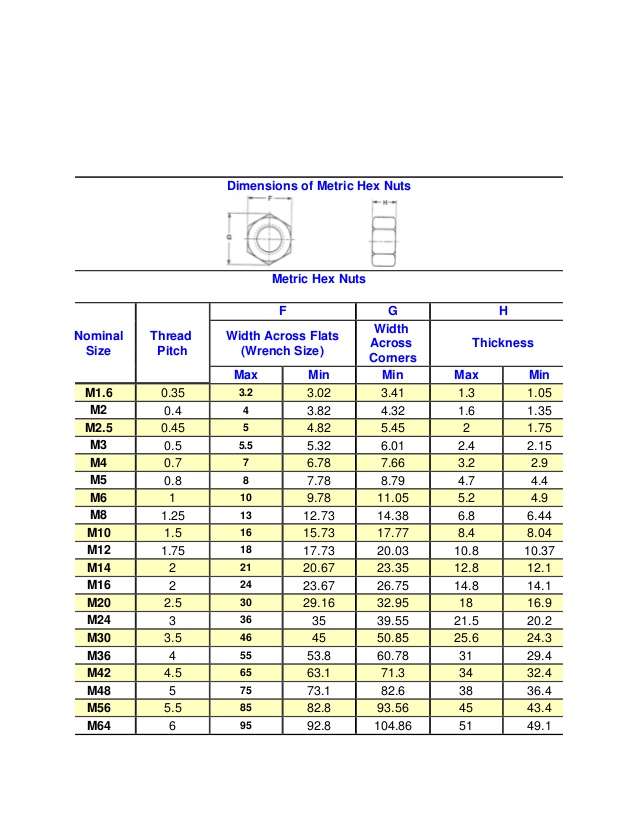
Dimension of Metric Hex Nuts
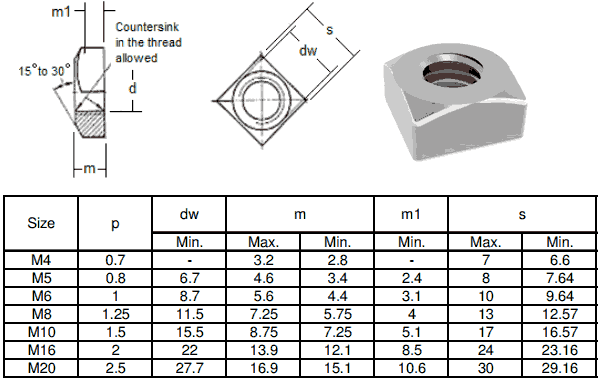
Metric Flat Square Nut Dimensions
Ten must know Fusion 360 quick Tips
Settings Pages List of URI Shortcuts in Windows 10 | Tutorials
List of Shortcuts to Directly Open Pages in Settings in Windows 10
The Settings app is where you can change most settings at in Windows 10. Settings will eventually replace the Control Panel.
Almost every Settings page has its own URI (Uniform Resource Identifier) that allows you to open any Setting page directly from a command via the command prompt, Run (Win+R) dialog, address bar of File Explorer, address bar of web browser, and in scripts (ex: .bat). You can also use these commands to create shortcuts.
This tutorial will provide you with a list of ms-settings URI commands to directly open or create shortcuts for any Settings page in Windows 10.
To use the URI commands to open Settings pages from a command prompt or script (ex: .bat), you would need to add the Start command with a space after it in front of the URI command in the table below.
For example, command below to open the About Settings page (System category) in command prompt:
Start ms-settings:about
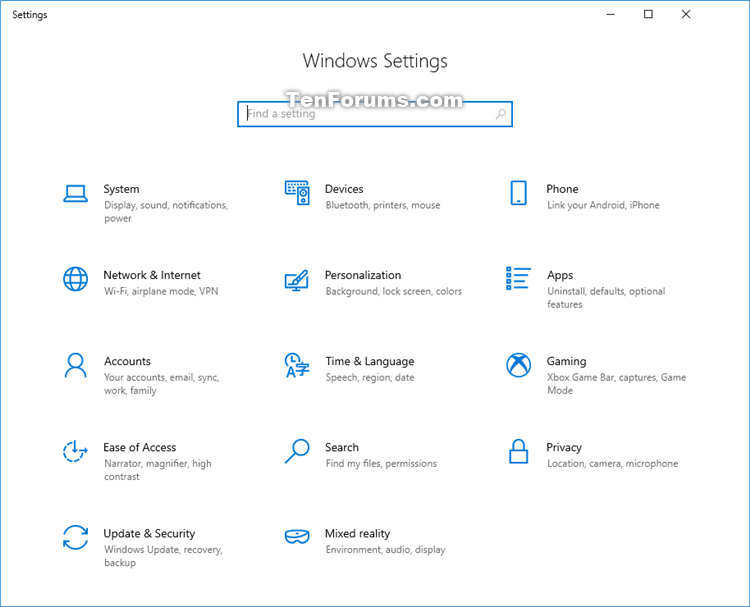
EXAMPLE: Settings home page
| Category | Settings page | URI Command (shortcut) |
| Settings home page | ms-settings: | |
| System | ||
| Display | ms-settings:display | |
|
Night light settings
|
ms-settings:nightlight | |
|
Advanced scaling settings
|
ms-settings:display-advanced | |
|
Connect to a wireless display
|
ms-settings-connectabledevices:devicediscovery | |
|
Graphics settings
|
ms-settings:display-advancedgraphics | |
| Sound (build 17063) | ms-settings:sound | |
|
Manage sound devices
|
ms-settings:sound-devices | |
|
App volume and device preferences
|
ms-settings:apps-volume | |
| Notifications & actions | ms-settings:notifications | |
| Focus assist (build 17074) | ms-settings:quiethours or ms-settings:quietmomentshome |
|
|
During these hours
|
ms-settings:quietmomentsscheduled | |
|
Duplicating my display (When I’m duplicating my display)
|
ms-settings:quietmomentspresentation | |
|
Playing a game full screen (When I’m playing a game)
|
ms-settings:quietmomentsgame | |
| Power & sleep | ms-settings:powersleep | |
| Battery | ms-settings:batterysaver | |
|
See which apps are affecting your battery life
|
ms-settings:batterysaver-usagedetails | |
|
Battery Saver settings
|
ms-settings:batterysaver-settings | |
| Storage | ms-settings:storagesense | |
|
Configure Storage Sense or run it now
|
ms-settings:storagepolicies | |
|
Change where new content is saved
|
ms-settings:savelocations | |
| Tablet | ms-settings:tabletmode | |
| Multitasking | ms-settings:multitasking | |
| Projecting to this PC | ms-settings:project | |
| Shared experiences | ms-settings:crossdevice | |
| Clipboard (build 17666) | ms-settings:clipboard | |
| Remote Desktop | ms-settings:remotedesktop | |
| Device Encryption (if available) | ms-settings:deviceencryption | |
| About | ms-settings:about | |
| Devices | ||
| Bluetooth & other devices | ms-settings:bluetooth or ms-settings:connecteddevices |
|
| Printers & scanners | ms-settings:printers | |
| Mouse | ms-settings:mousetouchpad | |
| Touchpad | ms-settings:devices-touchpad | |
| Typing | ms-settings:typing | |
|
Hardware keyboard – Text suggestions
|
ms-settings:devicestyping-hwkbtextsuggestions | |
| Wheel (Only available if Dial is paired) | ms-settings:wheel | |
| Pen & Windows Ink | ms-settings:pen | |
| AutoPlay | ms-settings:autoplay | |
| USB | ms-settings:usb | |
| Phone (build 16251) | ||
| Phone | ms-settings:mobile-devices | |
|
Add a phone
|
ms-settings:mobile-devices-addphone | |
|
Your Phone (opens app)
|
ms-settings:mobile-devices-addphone-direct | |
| Network & Internet | ms-settings:network | |
| Status | ms-settings:network-status | |
|
Data usage
|
ms-settings:datausage | |
|
Show available networks
|
ms-availablenetworks: | |
| Cellular & SIM | ms-settings:network-cellular | |
| Wi-Fi | ms-settings:network-wifi | |
|
Show available networks
|
ms-availablenetworks: | |
|
Manage known networks
|
ms-settings:network-wifisettings | |
| Wi-Fi Calling | ms-settings:network-wificalling | |
| Ethernet | ms-settings:network-ethernet | |
| Dial-up | ms-settings:network-dialup | |
| DirectAccess (Only available if DirectAccess is enabled) | ms-settings:network-directaccess | |
| VPN | ms-settings:network-vpn | |
| Airplane mode | ms-settings:network-airplanemode or ms-settings:proximity |
|
| Mobile hotspot | ms-settings:network-mobilehotspot | |
| NFC | ms-settings:nfctransactions | |
| Proxy | ms-settings:network-proxy | |
| Personalization | ms-settings:personalization | |
| Background | ms-settings:personalization-background | |
| Colors | ms-settings:personalization-colors or ms-settings:colors |
|
| Lock screen | ms-settings:lockscreen | |
| Themes | ms-settings:themes | |
| Fonts (build 17083) | ms-settings:fonts | |
| Start | ms-settings:personalization-start | |
|
Choose which folders appear on Start
|
ms-settings:personalization-start-places | |
| Taskbar | ms-settings:taskbar | |
| Apps | ||
| Apps & features | ms-settings:appsfeatures | |
|
Manage optional features
|
ms-settings:optionalfeatures | |
| Default apps | ms-settings:defaultapps | |
| Offline maps | ms-settings:maps | |
|
Download maps
|
ms-settings:maps-downloadmaps | |
| Apps for websites | ms-settings:appsforwebsites | |
| Video playback (build 16215) | ms-settings:videoplayback | |
| Startup (build 17017) | ms-settings:startupapps | |
| Accounts | ||
| Your info | ms-settings:yourinfo | |
| Email & accounts | ms-settings:emailandaccounts | |
| Sign-in options | ms-settings:signinoptions | |
|
Windows Hello face setup
|
ms-settings:signinoptions-launchfaceenrollment | |
|
Windows Hello fingerprint setup
|
ms-settings:signinoptions-launchfingerprintenrollment | |
|
Security Key setup
|
ms-settings:signinoptions-launchsecuritykeyenrollment | |
|
Dynamic Lock
|
ms-settings:signinoptions-dynamiclock | |
| Access work or school | ms-settings:workplace | |
| Family & other users | ms-settings:otherusers | |
|
Set up a kiosk
|
ms-settings:assignedaccess | |
| Sync your settings | ms-settings:sync | |
| Time & Language | ||
| Date & time | ms-settings:dateandtime | |
| Region | ||
| Japan IME settings (available if Microsoft Japan input method editor installed) | ms-settings:regionlanguage-jpnime | |
| Pinyin IME settings (available if Microsoft Pinyin input method editor installed) | ms-settings:regionlanguage-chsime-pinyin | |
| Wubi IME settings (available if Microsoft Wubi input method editor installed) | ms-settings:regionlanguage-chsime-wubi | |
| Language | ms-settings:regionlanguage | |
|
Windows display language
|
ms-settings:regionlanguage-setdisplaylanguage | |
|
Add Display language
|
ms-settings:regionlanguage-adddisplaylanguage | |
| Speech | ms-settings:speech | |
| Gaming | ||
| Xbox Game bar | ms-settings:gaming-gamebar | |
| Captures | ms-settings:gaming-gamedvr | |
| Game Mode | ms-settings:gaming-gamemode | |
| Xbox Networking (build 16226) | ms-settings:gaming-xboxnetworking | |
| Extras | (Only available if “settings apps” are installed (e.g. by 3rd party)) | |
| Extras | ms-settings:extras | |
| Ease of Access | ||
| Display (build 17025) | ms-settings:easeofaccess-display | |
| Mouse pointer (build 17040) | ms-settings:easeofaccess-cursorandpointersize OR ms-settings:easeofaccess-MousePointer |
|
| Text cursor | ms-settings:easeofaccess-cursor | |
| Magnifier | ms-settings:easeofaccess-magnifier | |
| Color Filters (build 17025) | ms-settings:easeofaccess-colorfilter | |
| High Contrast | ms-settings:easeofaccess-highcontrast | |
| Narrator | ms-settings:easeofaccess-narrator | |
|
Start Narrator after sign-in for me
|
ms-settings:easeofaccess-narrator-isautostartenabled | |
| Audio (build 17035) | ms-settings:easeofaccess-audio | |
| Closed captions | ms-settings:easeofaccess-closedcaptioning | |
| Speech (build 17035) | ms-settings:easeofaccess-speechrecognition | |
| Keyboard | ms-settings:easeofaccess-keyboard | |
| Mouse | ms-settings:easeofaccess-mouse | |
| Eye Control (build 17035) | ms-settings:easeofaccess-eyecontrol | |
| Search (version 1903) | ||
| Permissions & history | ms-settings:search-permissions | |
| Searching Windows | ms-settings:cortana-windowssearch | |
| Privacy | ms-settings:privacy | |
| General | ms-settings:privacy | |
| Speech | ms-settings:privacy-speech | |
| Inking & typing personalization | ms-settings:privacy-speechtyping | |
| Diagnostics & feedback | ms-settings:privacy-feedback | |
|
View diagnostic data
|
ms-settings:privacy-feedback-telemetryviewergroup | |
| Activity history (build 17040) | ms-settings:privacy-activityhistory | |
| Location | ms-settings:privacy-location | |
| Camera | ms-settings:privacy-webcam | |
| Microphone | ms-settings:privacy-microphone | |
| Voice activation | ms-settings:privacy-voiceactivation | |
| Notifications | ms-settings:privacy-notifications | |
| Account info | ms-settings:privacy-accountinfo | |
| Contacts | ms-settings:privacy-contacts | |
| Calendar | ms-settings:privacy-calendar | |
| Phone calls | ms-settings:privacy-phonecalls | |
| Call history | ms-settings:privacy-callhistory | |
| ms-settings:privacy-email | ||
| Eye tracker (requires eyetracker hardware) | ms-settings:privacy-eyetracker | |
| Tasks | ms-settings:privacy-tasks | |
| Messaging | ms-settings:privacy-messaging | |
| Radios | ms-settings:privacy-radios | |
| Other devices | ms-settings:privacy-customdevices | |
| Background apps | ms-settings:privacy-backgroundapps | |
| App diagnostics | ms-settings:privacy-appdiagnostics | |
| Automatic file downloads | ms-settings:privacy-automaticfiledownloads | |
| Documents | ms-settings:privacy-documents | |
| Downloads folder (build 19536) | ms-settings:privacy-downloadsfolder | |
| Pictures | ms-settings:privacy-pictures | |
| Videos | ms-settings:privacy-documents | |
| File system | ms-settings:privacy-broadfilesystemaccess | |
| Screen capture border (build 19536) | ||
| Programmatic screen capture (build 19536) | ||
| Update & Security | ms-settings:windowsupdate | |
| Windows Update | ms-settings:windowsupdate | |
|
Check for updates
|
ms-settings:windowsupdate-action | |
|
View optional updates
|
ms-settings:windowsupdate-optionalupdates | |
|
Change active hours
|
ms-settings:windowsupdate-activehours | |
|
View update history
|
ms-settings:windowsupdate-history | |
|
Restart options
|
ms-settings:windowsupdate-restartoptions | |
|
Advanced options
|
ms-settings:windowsupdate-options | |
| Delivery Optimization | ms-settings:delivery-optimization | |
| Windows Security | ms-settings:windowsdefender | |
|
Open Windows Security
|
windowsdefender: | |
| Backup | ms-settings:backup | |
| Troubleshoot | ms-settings:troubleshoot | |
| Recovery | ms-settings:recovery | |
| Activation | ms-settings:activation | |
| Find My Device | ms-settings:findmydevice | |
| For developers | ms-settings:developers | |
| Windows Insider Program | ms-settings:windowsinsider or ms-settings:windowsinsider-optin |
|
| Mixed reality | ms-settings:holographic | |
| Audio and speech | ms-settings:holographic-audio | |
| Environment | ms-settings:privacy-holographic-environment | |
| Headset display | ms-settings:holographic-headset | |
| Uninstall | ms-settings:holographic-management | |
| Surface Hub | ||
| Accounts | ms-settings:surfacehub-accounts | |
| Team Conferencing | ms-settings:surfacehub-calling | |
| Team device management | ms-settings:surfacehub-devicemanagenent | |
| Session cleanup | ms-settings:surfacehub-sessioncleanup | |
| Welcome screen | ms-settings:surfacehub-welcome |
Source: Settings Pages List of URI Shortcuts in Windows 10 | Tutorials