Normandy Pref Rollout is a feature that allows Mozilla to change the default value of a preference for a targeted set of users, without deploying an update to Firefox. This document focuses on the use of Pref Rollout as a mechanism to enable feature flagging in Firefox.
Monthly Archives: May 2019
WindowsInternal.ComposableShell.Experiences.TextInput.InputApp.exe blocks : Windows10
WindowsInternal.ComposableShell.Experiences.TextInput.InputApp.exe blocks
by inWindows10
WindowsInternal.ComposableShell.Experiences.TextInput.InputApp.exe blocks
If I accidentally press Win+H, a keyboard will appear on the screen. When I close it, a ghost “window” stays in its place. Nothing is visible, but if I click with the mouse in that part of the screen, the visible window does not receive the event. It’s pretty infuriating and I can’t figure out how to disable this feature entirely. Does anyone know?
In a command prompt or powershell (admin):reg add "HKLM\SOFTWARE\Microsoft\Windows NT\CurrentVersion\Image File Execution Options\WindowsInternal.ComposableShell.Experiences.TextInput.InputApp.exe" /v Debugger /d "%SystemRoot%\system32\systray.exe" /f taskkill /im "WindowsInternal.ComposableShell.Experiences.TextInput.InputApp.exe" /t /f echo doneUndo:
reg add "HKLM\SOFTWARE\Microsoft\Windows NT\CurrentVersion\Image File Execution Options\WindowsInternal.ComposableShell.Experiences.TextInput.InputApp.exe" /v Debugger /f
echo done
Obviously this will disable touch keyboard completely, but you can use OSK instead if ever needing it.

Disable Caps Lock Key – Win10
1. Press Windows+C to open the Windows Charm Screen-> Go to Search to open the Apps Search Field.
Now, just type regedit.exe in the search field.
2. You will find an option on the left side of the registry editor calledHKEY_LOCAL_MACHINE. Expand it.
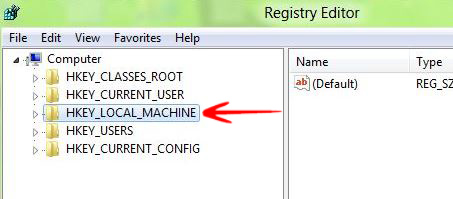
3. Go to SYSTEM and expand it.
4. Choose CONTROL and expand it
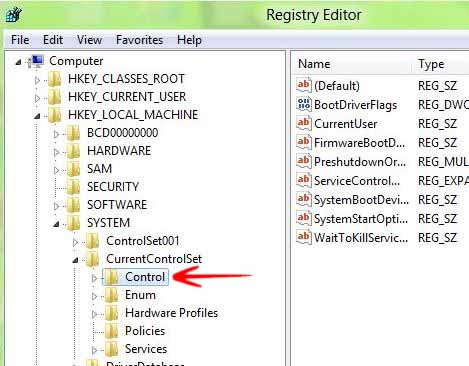
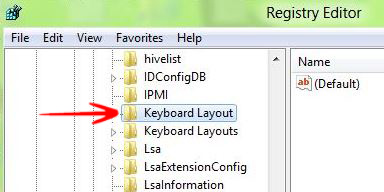
5. Choose KeyBoard Layout and expand it.
6. In the right side of the screen Right click-> Go to New-> Select Binary Value.
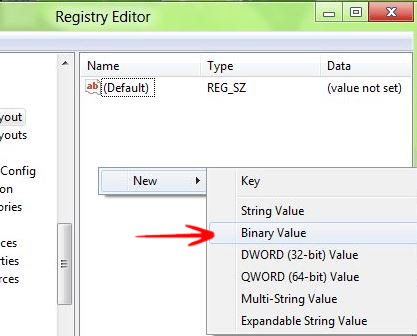
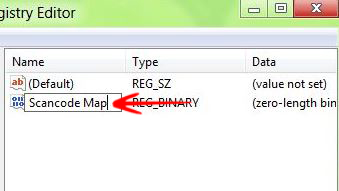
7. Name it Scancode Map.
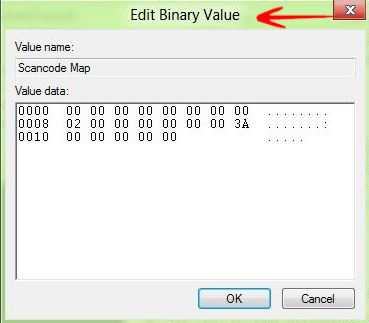
8. Double click on it and write the value 00000000 00000000 02000000 00003A00 00000000 and press OK.
9. Close the Registry Editor and Reboot.