Over 15 years after it was first publicly disclosed, SQL injection is still the number one threat to websites.
Source: The History of SQL Injection, the Hack That Will Never Go Away | Motherboard
Source: The History of SQL Injection, the Hack That Will Never Go Away | Motherboard
Emoji are standardized, but the variations across devices are enough to totally change the meaning of what you’re trying to convey.
Source: What the Emoji You’re Sending Actually Look Like to Your Friends | Motherboard
Some utilities have a “secure delete” option that promises to securely erase a file from your hard drive, removing all traces of it. Older versions of Mac OS X have a “Secure Empty Trash” option that tries to do something similar. Apple removed this feature recently because it just doesn’t work reliably on modern drives.
Source: Why You Can’t “Securely Delete” a File, and What to Do Instead
In this post, I collected all Group Policy settings that are related to privacy in Windows 10. I will update the list when I receive new information. Please
Source: Windows 10 privacy – All Group Policy settings – 4sysops
1) Open Settings
2) In the “Find a setting” search box, type Device Manager
3) Open Device Manager
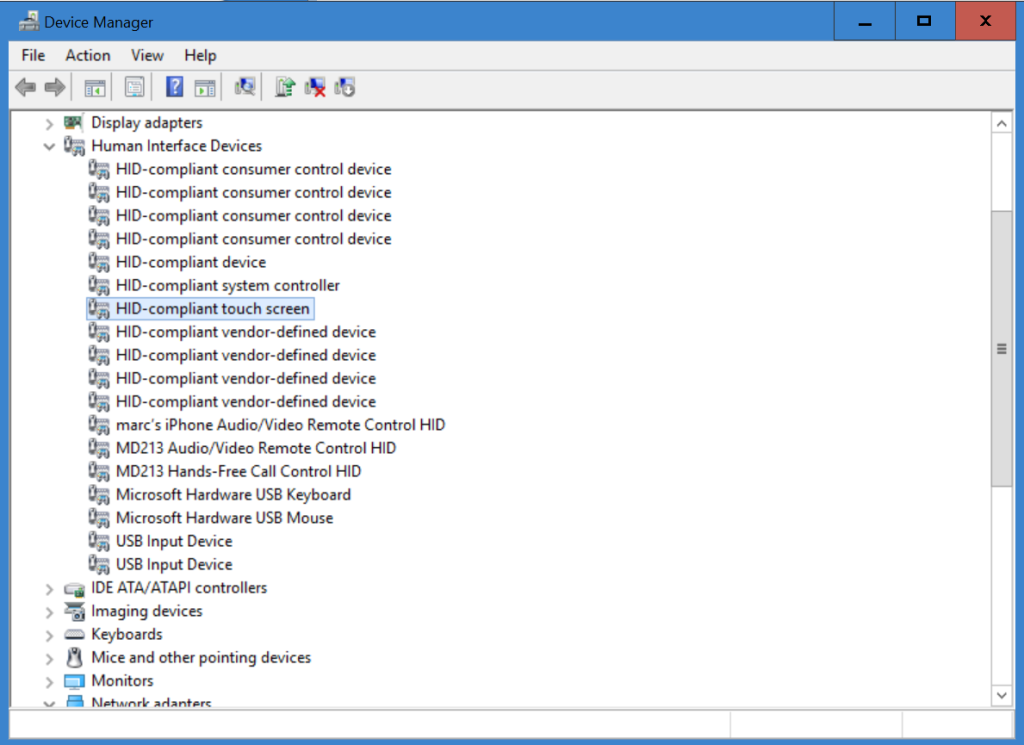
4) Find the Human Interface Drivers item, and double click it to expand the list.
5) Click on HID-Compliant touch screen, then RIGHT CLICK it and choose Disable from the context menu.
6) Click Yes.
7) Close Device Manager and Settings. You’re done.
Thanks to a new feature in Windows 10 version 1511, you can now postpone or pause Windows 10 upgrades and updates. You don’t have to be an IT pro to use Windows Update for Business (although it helps), but you’ll need a business edition of Windows 10. I’ve got the details here.
Source: How to take control of Windows 10 updates and upgrades (even if you don’t own a business) | ZDNet
Over the last month or so I’ve had loads of emails about the Windows Update reboot nag screen. Basically, people think that it’s a pain in the rear and want to know if there’s a way to get rid of it or at least customize it
Source: Take control of the Windows Update reboot nag screen | ZDNet
20,000 samples found impersonating apps from Twitter, Facebook, and others.
Source: New type of auto-rooting Android adware is nearly impossible to remove | Ars Technica
Most commonly shared data for Android is e-mail addresses; for iOS, it’s GPS data.
Source: User data plundering by Android and iOS apps is as rampant as you suspected